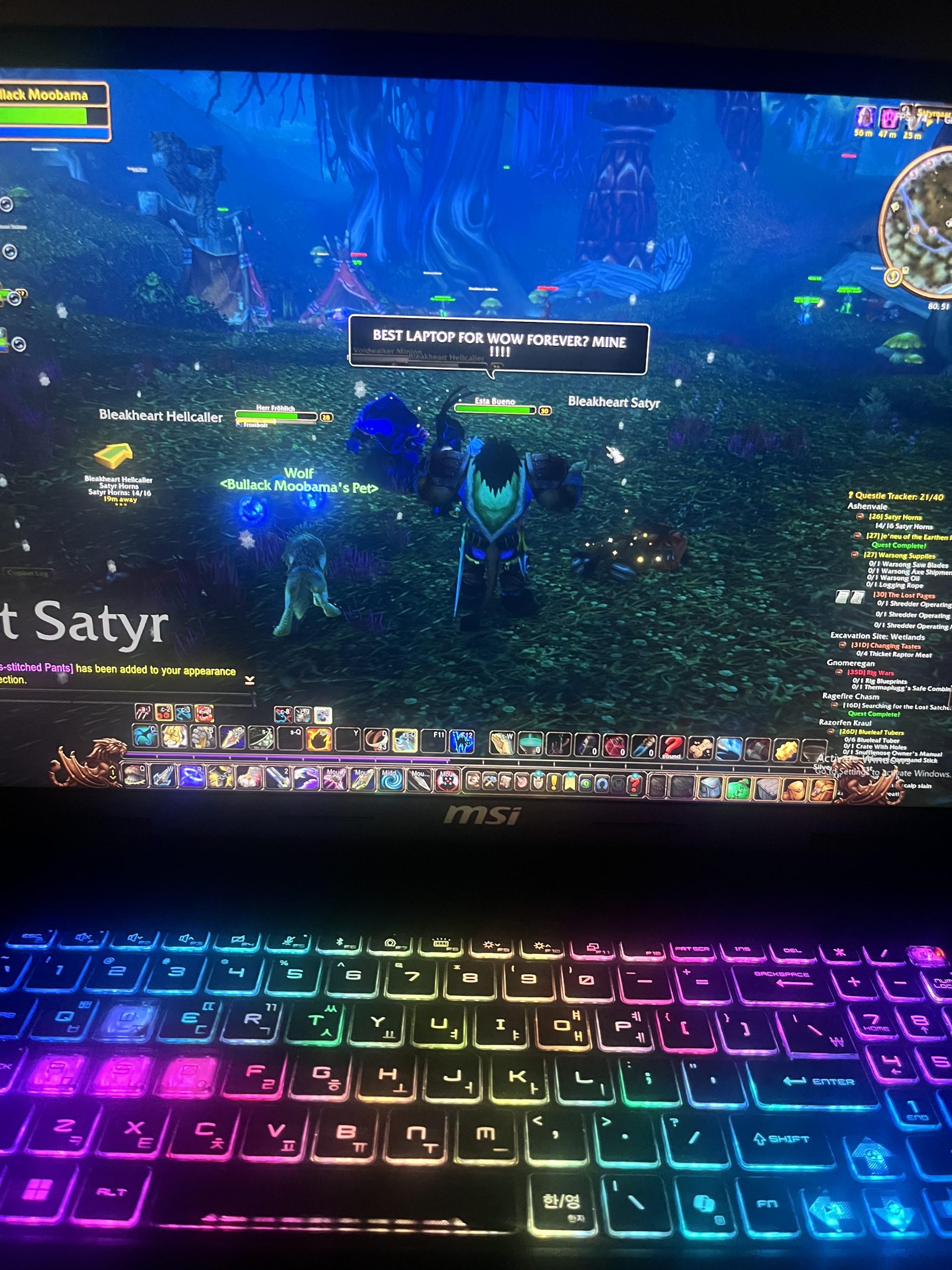
5 Best Laptops For WoW Forever – November 2026 Update
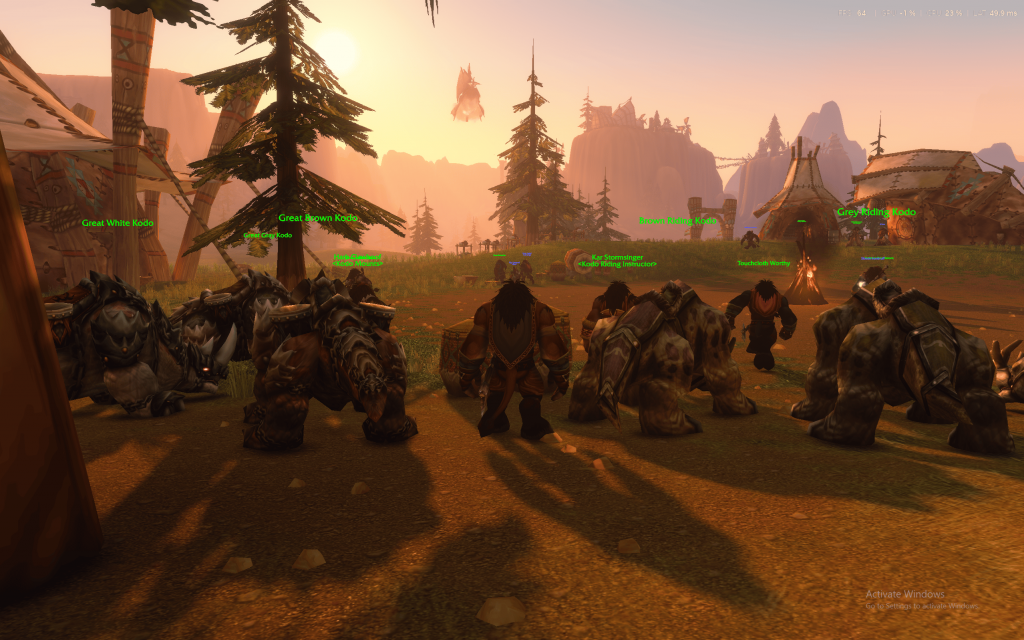
I’ve been playing WoW Forever Beta since launch, benchmarking it on several laptops featured on my channel. My conclusion? WoW Forever is slightly more GPU demanding the Midnight and any laptop that runs WoW Forever well should also run Midnight and The Burning Crusade Classic Anniversary, likely at higher FPS.

If you’re coming here because you think you need a better rig to run WoW Forever or Midnight: no, you don’t.
WoW still scales pretty well with almost any hardware. Even if you’re running the game on some ancient potato, you can still run it as long as you tweak the settings. You might have to revert to “classic graphics” for rigs with integrated graphics, though.
Now…
If you want WoW Forever or Midnight running with the current graphics design (non-classic) at medium-high (4-6) graphics settings easily for LONG gaming sessions lasting several hours…..you’ll need an entry-level to mid-range dedicated GPU. At the very least, an RTX 2050/GTX 1650.
HP Victus 15.6″
For HIGH-ULTRA (7-10) settings & maximum viewing distance at FHD with ~80-100 FPS….you’ll need either an RTX 4050 or an RTX 3050 Ti, which can be found in laptops starting at 800 bucks.
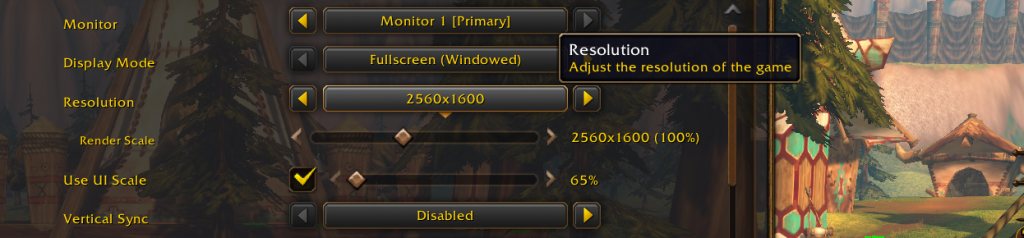
To run the game at beast settings (Ultra 10) with 1440p or 1600p (QHD+) resolution for either WoW Forever or Midnight, you’ll need at least an RTX 5060, preferably an RTX 5070, so temperatures remain stable and low.
My top recommendation would be the very same laptop I own, which we’ll review first.
MSI Crosshair 18 HX
Yeah, laptops are crazy powerful these days. Forget all that ‘PC master race’ and ‘desktops or bust’ nonsense. If your wallet allows it, you can get laptop performance that’s pretty close to a desktop.
For arenas…
You don’t want a fancy display running at 4K/1440p. You want high FPS at FHD + max viewing distance so your team gets the opener and mechanics right from the start. So, at least an RTX 4050.
Now, I’ve been playing WoW since 2003….

For raids, I’ll go with fully maxed-out graphics, but for crowded places like Tol Barad/AV/Tarren Mill….you should lower the settings to 6 or even 4 because you’ll experience LAG regardless, and that’s true for the WAR events coming up in WoW Forever as well. If you plan on PvPing HARDCORE the whole time, then don’t waste money on QHD/fancy displays.
Recommended Specs for World of Warcraft
You’re welcome to skip this section and check out the best laptops for World of Warcraft I’ve listed. It’s technical stuff for those who don’t have access to my recommendations OR those who would rather look for something else.
When choosing a laptop for gaming, it’s really all about the GPU. Here’s the most common GPUs found on new laptops as of LATE 2026:
NVIDIA:
MX450,MX550,1650GTX,1650TiGTX,2050RTX,3050,3050Ti,1070GTX,3060RTX,4050RTX,4060RTX,5050RTX,4070RTX,5060RTX,4080RTX,5070RTX,4090RTX,5080RTX,5090RTX
AMD:RX5500M,RX5600M,RX6600M,RX6650M,RX6700M,RX6700S,RX6800S,RX7600S,RX7700S,RX7800M,RX7900M
GPU
WoW Retail & WoW Forever is mostly GPU agressive. There’s little CPU Usage (you’ll see soon). Classic TBC? Pandaria? Not really, you only need a 3050Ti (4GB vRAM) for the highest settings and the CPU gets a good share of the load too. The following applies for WoW Forever & Midnight ONLY (estimates based on benchmarks):
Entry-Level GPUs: Can pull off 50fps at ultra settings. EX: MX450. Approx. 60-70 with the MX550.
MainStream GPUs: ~70fps on Ultra Settings. 600-700$.
Mid-range GPUs: 75-80fps on Ultra Settings (PvP or Dungeon) , 90-100fps (Questing). Ideal for HIGH settings for long periods of time. $700 dollars (Up to 900).
High-End: Ideal for playing at ULTRA for LONG periods of time. Can play short burts of 1440p or even 4k.
Top tier: Ideal for playing 1440p for long periods of time.
The footage of these benchmarks and framerates are listed in the last section of this post.
MUX SWITCH & GPU TGP
GPUs performance depends heavily on GPU TGP (how much power they use) & whether or not they have a MUX Switch. If you’re buying laptops with High-End or Top-Tier GPUs, understanding these two concepts are a MUST. If not, you could be losing a lot of performance for a given budget or you may be overpaying for a machine that doesn’t perform as well as others.
1080p WoW Gaming:
- Ex: You want high wattage (115 to 130W) for a mid-tier GPU like the 4060RTX, 5060RTX, 3060RTX otherwise you’re wasting money. Ex: Low power 3060RTX GPUs perform worse than a low power 4050RTX which is cheaper.
- MUX Switch: gives you 15-20% increased GPU performance (15-20% more fps). Having high TGP (power) is more important though.
1440p or 4k gaming:
- 5060RTX, 5050RTX, 4070RTX, 4080RTX, 4060RTX, 3070 RTX & 3080RTX without a MUX Switch & running at low power still outperform laptops all other GPUs.
- If you can get these with a MUX Switch and especially at HIGH WATTAGE (TGP), you will get near desktop level performance.
CPU
WoW is more multi-threaded than ever but clock speed performance is still more important.
Now being able to tell Which CPU is “faster” isn’t just about looking at the CPU’s clock speed (though that’s a good indicator). You can get a more accurate relative performance by looking at single-thread benchmarks.
RAM & Storage
8GB: WoW takes 2GB. Windows 10 takes 3.5 GB. Discord ~1GB. This is enough for WoW.
16GB: This will bump up FPS slightly (+10fps). However, it’s a must if you end up with an an integrated GPU (laptop below 550 $ ). Useful for streaming too.
Dual-Channel: If you get x2 RAM sticks of the same stats (size, brand, type) you activate DC mode and get an extra 5-15fps. More on this post.
Storage
Will need 512GB to play all versions of the game: 128GB for Midnight (70GB for Classic Hardcore and 128GB for Classic Pandaria ) + Windows (64GB). That’s way more than 256GB.
Storage speed doesn’t make a difference for gaming performance. If you want to play several AAA games then check out this post to see how much space you’ll need.
Top 5 Best Laptops for World of Warcrat
“Laptopstudy.com doesn’t unnecessarily list or repeat laptop features and specifications. Instead, we focus on the features that are important for the game and explain how they affect gameplay.
Whenever possible, we’ll include performance benchmarks and gameplay footage with WoW. Unfortunately, there aren’t many Midnight & WoW Forever laptop benchmarks available other than our own, so we’ll include DragonFlight & Shadowlands benchmarks when there’s a lack of benchmarks to get an idea of the performance of a given GPU.
1. MSI Crosshair 18 HX AI
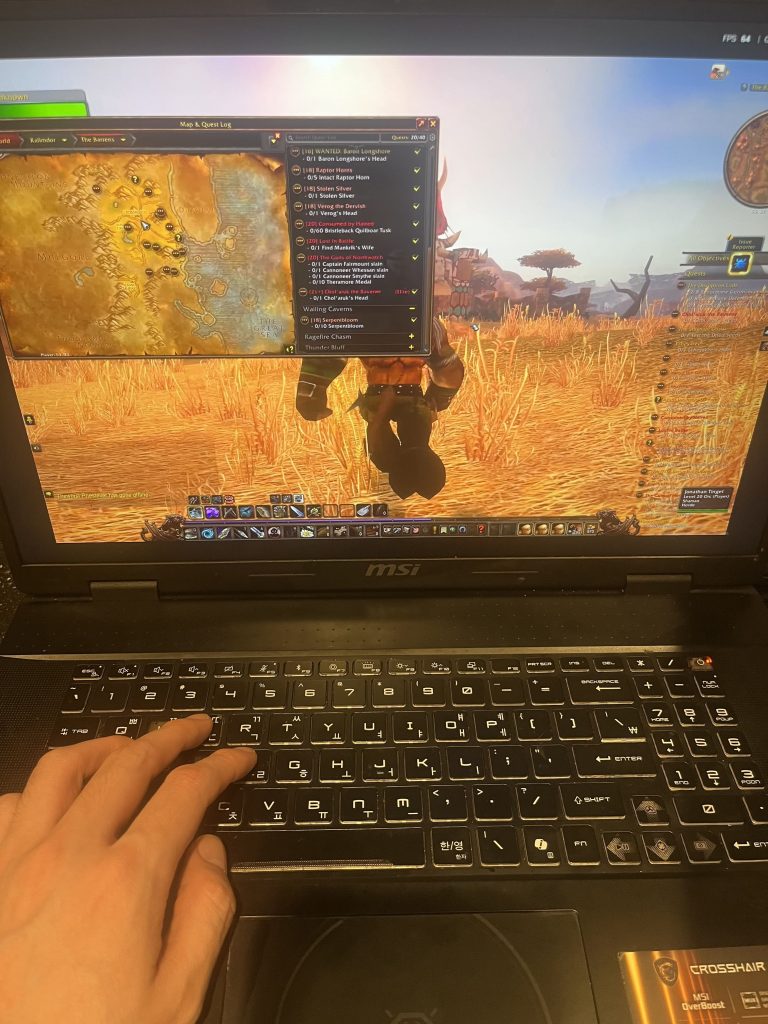
Best High-End Laptop for World of Warcraft – RTX 5070
Here’s the deal guys: the RTX 5070 is OVERKILL for 1080p gameplay especially in World of Warcraft. I’d advice you to buy this laptop only for two reasons: QHD resolution (1440p) or the super large display for FHD (18″ – biggest display now). Or if you play FPS games like Call of Duty and CS2 where framerates into the 200s at FHD are possible and VISIBLE due to the 240Hz display.
As far as WoW Forever & Midnight is concerned, it’s really mostly for 1400p gameplay.
Ryzen 9/Core Ultra 9
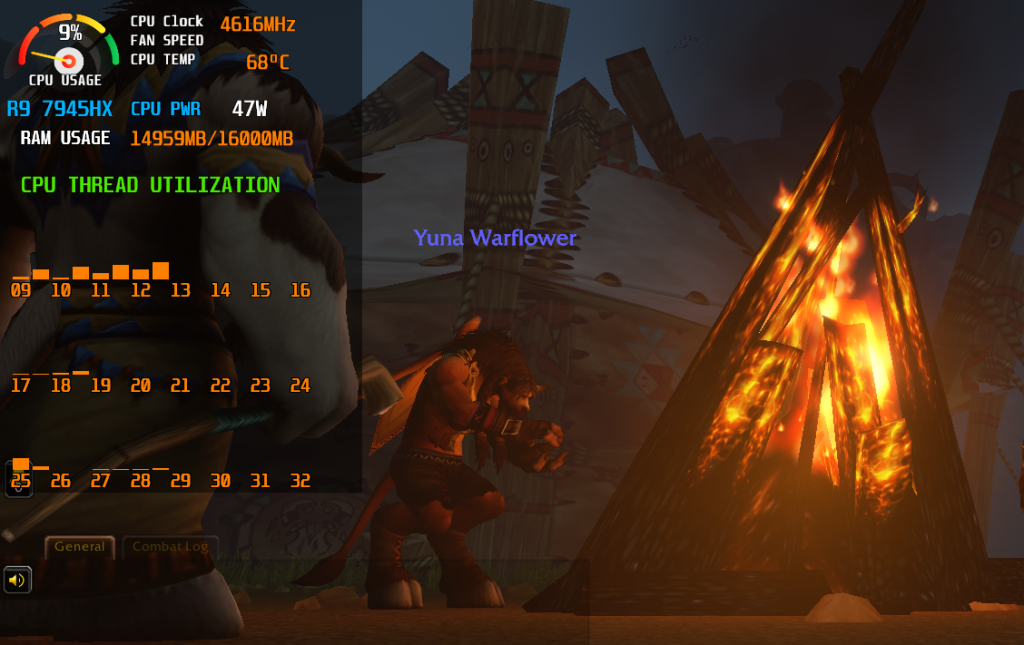
You’ll find this model with a myriad of different CPUs however limited to the Core i9 and Ryzen 9 families. For WoW Forever & Midnight, ANY CPU it comes with will be fine, since CPU usage is MINIMAL as you can see in the benchmark I carried above and other videos on my channel. It’s the GPU doing most of the workload. All CPUs that come by default with this model will avoid ANY CPU bottleneck.
RTX 5070 8GB vRAM
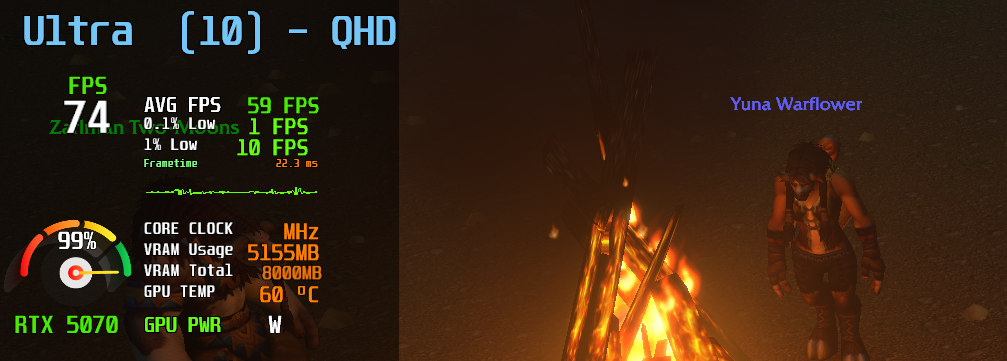
Here’s the deal. The 5070RTX GPUs found on laptops can run anywhere from 50W to 115W. However, 5th generation RTX GPUs do not necessarily perform better at higher wattages. In our benchmarks, the 5070RTX on this laptop stayed consistently at 60W when running the game at 1440p and temperatures around 62C. Well below the safe threshold for long gaming sessions. So yes this laptop is basically BUILD for 1440p gameplay.
QHD+ 18 inch Display: 1600p Gaming
18-inch IPS-level panel with a 2560 × 1600 resolution, 16:10 aspect ratio and 240Hz refresh rate.
Technically this is a little taller than regular 2560 × 1440 QHD because of the 16:10 aspect ratio. For WoW that’s actually useful because the extra vertical space gives you more room for action bars, WeakAuras, raid frames, Details!, quest trackers and the rest of the interface.
The highlight here though is the QHD display…as you can see in my youtube channel. It’s cristal clear and super defined. The difference between FHD and QHD goes beyond quality graphics though but that’s another topic….
You can read my QHD vs FHD laptop display guide if you’re unsure whether the higher resolution is worth it.
Cooling: Why the 18-inch Chassis Matters
Running WoW at 1600p Ultra settings for several hours is a lot different from running the game for ten minutes in a benchmark. You need a chassis capable of keeping both the CPU and GPU from throttling once heat builds up.
Cooling: MSI uses Cooler Boost 5 with two fans and up to six heat pipes.
Combined Power: MSI’s OverBoost system allows up to approximately 170W of combined CPU and GPU power under the appropriate performance mode.
This is one reason I prefer larger 16-inch, 17-inch and 18-inch laptops for prolonged QHD gaming. There’s simply more physical room for fans, heat pipes and exhaust vents. You can read more about this in my laptop cooling system guide.
RTX Ray Tracing: ON vs OFF
What about RTX features? They’re definitely NOT the reason I would buy this laptop for WoW.
World of Warcraft supports ray-traced shadows, but the visual difference isn’t nearly as dramatic as what you’ll see in games designed around heavy ray tracing. Character models, lighting and shadows can look a little nicer, especially in newer zones, but you can absolutely play with ray tracing disabled and the game still looks great.
If you’re trying to maximize frame rates during raids or crowded areas, turn ray tracing OFF. The RTX 5070 supports it, obviously, but there’s no reason to sacrifice FPS for a fairly subtle visual improvement when things get busy.
One thing you should know is that in WoW Forever RTX mode is activated by default so going to the menu and disabling it won’t do anything to your performance.
RAM : 16GB vs 32GB DDR5

Here’s where this laptop falls short. The base model (cheapest model) comes with 16GB DDR5 RAM which is plenty enough for WoW even at 1440p as shown in the stats by Rivaturner in my benchmarks. However, it wouldn’t hurt to get some headroom with 32GB DDR5 right? Unfortunately DDR5 RAM sticks are crazy expensive and you’ll bump the price of this laptop from 1700 to 2000 just by increasing RAM.
If you’re planning on playing other games at 1440p or 4k, be aware that 16GB RAM may not be enough. For a comprehensive list on games that MIGHT need slightly more than 16GB RAM check out my post here: RAM Usage in Games.
Update: I have run more tests on my youtube channel. This laptop runs the game at 4K RESOLUTION with high fps on dungeons with lots of mobs. Outside of dungeons framerates will drop dramatically due to the viewing distance requiring the GPU to render more image data, however, framerates go back up to 80-100fps at 4k if viewing distance is set to near.
2. HP Victus 15.6
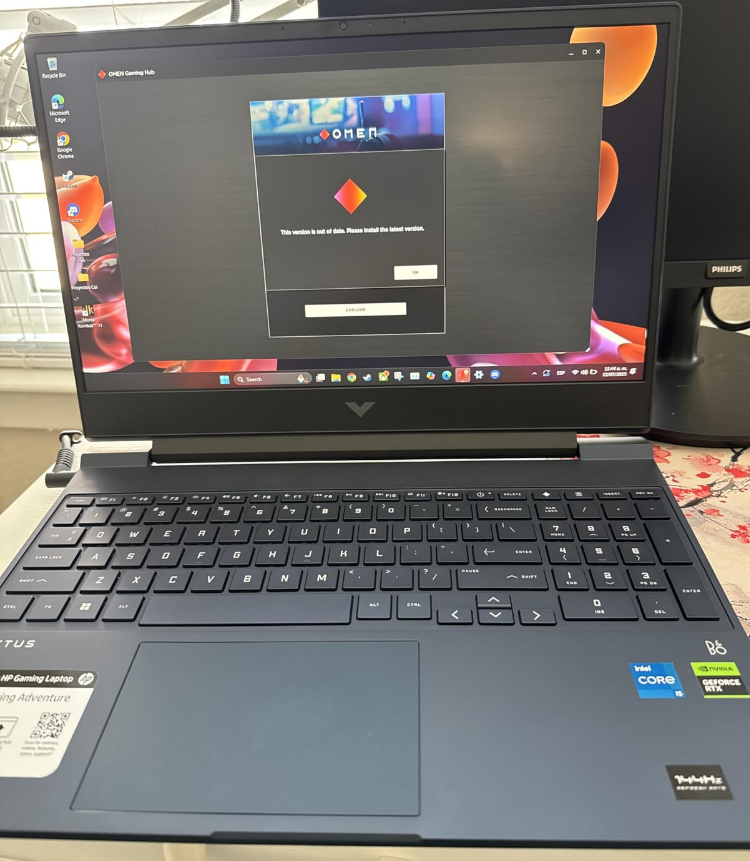
Cheap Gaming Laptop for World of Warcraft – RTX 2050
If you’re playing World of Warcraft: Midnight or WoW Forever, the GPU should be your main concern. From my own benchmarks, the newer versions of WoW have become MUCH more GPU dependent than older versions of the game. The RTX 2050 is still enough for 1080p gaming, but this is basically the entry point I’d recommend for the modern game. The Ryzen 5 7535HS is also a nice bonus if you jump back into older versions such as WoW Classic, Hardcore, Burning Crusade or Pandaria, where CPU performance starts to matter much more.
GPU: NVIDIA RTX 2050 4GB
This is the most important piece of hardware if you’re buying the laptop specifically for WoW Midnight or WoW Forever.
Based on the benchmarks I’ve carried out, the newer the version of World of Warcraft gets, the more GPU dependent the game becomes. Midnight and WoW Forever put substantially more pressure on the graphics card than the old versions of WoW.
This means you shouldn’t obsess too much over having the absolute fastest CPU if you’re buying a laptop specifically for the modern game. Once you’re using a reasonably modern Ryzen 5 or Core i5, moving up to a faster GPU usually has a much bigger effect on performance.
RTX 2050: This is basically the entry-level GPU I’d consider for modern WoW at 1080p. It’s enough for questing, dungeons, raids and general exploration with reasonably high graphics settings, but you’re not buying this to max out every setting in Midnight.
4GB vRAM: Fine for 1080p WoW. The limitation becomes more obvious if you start increasing render resolution, pushing very high texture settings or playing much more demanding modern games.
CPU: AMD Ryzen 5 7535HS
The CPU story changes depending on WHICH version of World of Warcraft you’re playing.
Midnight / WoW Forever: These versions are much more GPU dependent in my testing. Once you have a modern six-core CPU like the Ryzen 5 7535HS, the RTX 2050 becomes the much more important limitation.
WoW Classic / Hardcore / Burning Crusade / Pandaria: These older versions behave differently. They’re much lighter on the GPU and become noticeably more dependent on the CPU.
This is where the Ryzen 5 7535HS becomes more interesting.
Intel Core i5 processors can sometimes show stronger performance on the first or fastest core, but in my benchmarks that advantage tends to wear off as additional cores are used. Ryzen 5 CPUs generally maintain stronger performance across the remaining cores, which can translate into some extra FPS in the older, more CPU-dependent versions of WoW.
So if you play BOTH modern WoW and older expansions, the Ryzen 5 is actually a very nice fit: the RTX 2050 handles the modern GPU-heavy game while the Ryzen CPU gives you strong multi-core performance for the older versions.
RAM: 8GB DDR5
8GB DDR5: This is the weakest part of this particular configuration.
World of Warcraft will run with 8GB, but I would strongly prefer 16GB in 2026, especially if you’re running Battle.net, Discord, a browser, add-ons and other applications in the background.
Modern WoW can also become heavier once you start loading large zones, lots of add-ons and other assets. Upgrading from 8GB to 16GB is a much more sensible upgrade than going crazy with 32GB or 64GB just for WoW.
My recommendation: 16GB is the sweet spot. If you buy this Victus with 8GB, upgrade the RAM before worrying about anything else.
Modern WoW vs Older WoW
Midnight: Much more GPU dependent. The RTX 2050 will usually be the component controlling how far you can push the graphics settings.
WoW Forever: Same general behavior from my benchmarking. Graphics load matters substantially more than it did in the older WoW engines.
Classic / Hardcore: Much lighter graphically. Once the GPU requirement drops, differences between CPUs become easier to notice.
Burning Crusade / Pandaria: Again, CPU performance becomes relatively more important than it is in Midnight or WoW Forever.
In other words: the more modern the WoW version, the more I’d prioritize the GPU. The older the version, the more carefully I’d look at the CPU.
RTX 2050 vs GTX 1650
There still aren’t many useful World of Warcraft benchmarks using an RTX 2050 laptop, but the older GTX 1650 gives us a decent reference point because both GPUs sit in roughly the same general performance class.
You can see a direct comparison here:
I also previously benchmarked World of Warcraft using a GTX 1650 laptop:
Those older results should NOT be interpreted as exact Midnight or WoW Forever FPS numbers because the modern versions of WoW are significantly more demanding on the GPU.
They’re still useful for getting a rough idea of what this entry-level GPU class can do at 1080p.
144Hz Full HD Display
At Full HD, the RTX 2050 has a much better chance of maintaining smooth performance while still letting you use reasonably high graphics settings.
The 144Hz refresh rate is also a big improvement over the old cheap gaming laptops that used 60Hz displays. WoW can easily exceed 60 FPS in many areas, so the higher refresh rate actually gets used.
Ray Tracing: Keep It Off
The RTX 2050 supports ray tracing and modern WoW supports ray-traced shadows, but I wouldn’t use them on this laptop.
Midnight and WoW Forever are already much more GPU demanding than older versions of WoW. Adding ray tracing simply puts even more pressure on the component that’s already doing most of the work.
The visual difference isn’t big enough to justify the performance hit on an RTX 2050.
For this GPU: Ray tracing OFF, regular high settings ON.
512GB SSD Storage
For World of Warcraft and Windows, this is fine. WoW itself isn’t going to consume the entire drive.
The problem starts if you also install several modern AAA games. A few large titles can fill a 512GB SSD extremely quickly.
If WoW is your primary game, however, 512GB is perfectly workable.
Price: RTX 2050 vs RTX 4050
At around $750, this laptop sits in a slightly awkward position.
It’s cheap enough to qualify as a budget gaming laptop, but RTX 4050 laptops aren’t THAT much more expensive anymore.
The Acer Nitro V RTX 4050 above costs around $930. That’s roughly $180 more, but the jump in GPU performance is significant, and that matters especially for Midnight and WoW Forever because those versions are much more GPU dependent.
If you mainly play modern WoW: Spend more on the GPU if your budget allows it.
If you mainly play Classic, Hardcore, Burning Crusade or older expansions: The RTX 2050 is already more than enough graphically, and the Ryzen 5 7535HS becomes one of the more important reasons to buy this laptop.
If this Victus drops closer to $600-$650: That’s when I think it becomes a much stronger deal.
Trade-Offs
GPU: Enough for 1080p WoW, but it’s still entry-level hardware for modern Midnight/WoW Forever graphics.
RAM: 8GB is usable but I’d upgrade to 16GB.
Weight: Around 5 lbs, so this isn’t particularly light.
Battery: Gaming should be done plugged in anyway. Expect only a few hours under gaming loads and reduced performance when unplugged.
Value: At $750, check RTX 4050 prices before buying. If the price difference is small, the RTX 4050 makes more sense for modern WoW.
3. Acer Nitro V 15
Best Mid-Range Laptop for World of Warcraft – RTX 4050
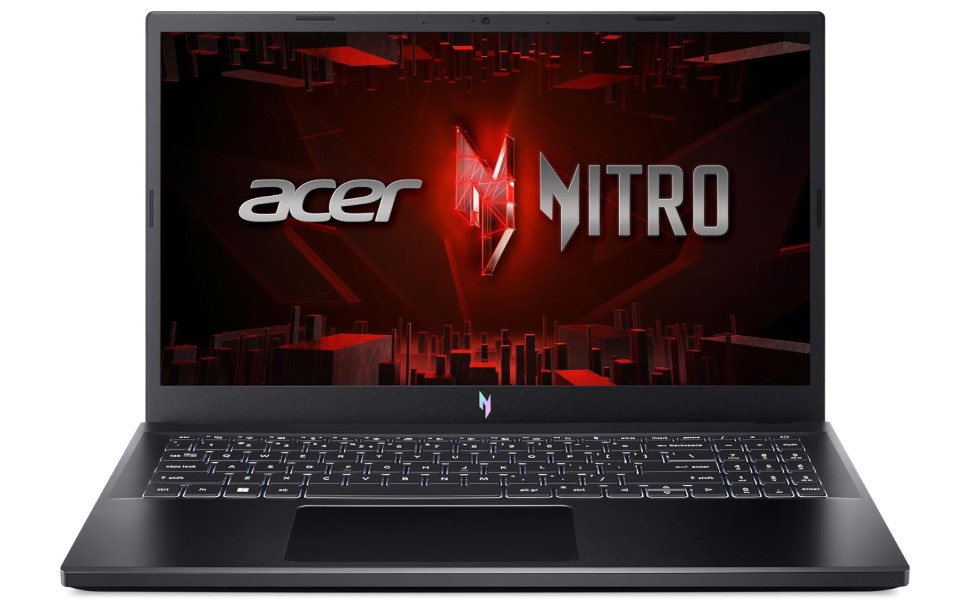
As of October 2026, RTX 5060 laptops start around 1300 bucks, but you DON’T need one just to play World of Warcraft. The RTX 4050 is still one of the best bang-for-your-buck GPUs for WoW Midnight and the WoW Forever beta at 1080p. Unlike older versions of WoW, these modern versions are heavily GPU dependent in my benchmarks, so the jump from an RTX 2050 to an RTX 4050 matters much more than chasing a slightly faster CPU. The Acer Nitro V gives you that RTX 4050, a 165Hz display and a Core i5-13420H for around $930.
GPU: NVIDIA RTX 4050 6GB
This is the main reason to spend more money on the Acer Nitro V instead of the RTX 2050 Victus above.
Based on my benchmarks, WoW Midnight and WoW Forever are much more GPU dependent than older versions of World of Warcraft. The more modern the version of the game gets, the more important the graphics card becomes.
That means the RTX 4050 gives you a much more noticeable performance boost in Midnight and WoW Forever than simply moving from one recent Core i5 or Ryzen 5 CPU to another.
6GB vRAM: You also get more graphics memory than the RTX 2050’s 4GB. That’s useful when increasing graphics quality, render resolution and texture settings.
For 1080p World of Warcraft, the RTX 4050 is already more than enough for most players. This is where I think you start getting the best combination of price, graphics quality and framerate without jumping into much more expensive RTX 5060 or RTX 5070 laptops.
World of Warcraft RTX 4050 Benchmark
There still aren’t that many controlled World of Warcraft benchmarks using current laptop GPUs, especially now that we’re already testing WoW Forever.
However, this RTX 4050 benchmark gives you a good idea of what this GPU class can do:
In that test, framerates while playing SOLO sit around the 100 FPS range, while performance can fall toward roughly 60 FPS once there are many players and effects on screen.
Don’t take those numbers as exact WoW Forever beta or Midnight results. The benchmark uses a different RTX 4050 laptop and different game content. What matters is that it shows the general performance class of the GPU.
For the modern game, I would expect the GPU load to be the bigger concern. For older expansions, CPU differences start becoming much more noticeable.
RTX 4050 Wattage: Don’t Ignore TGP
One thing you should understand before shopping for ANY RTX 4050 laptop is that the GPU name by itself doesn’t tell you the whole story.
RTX 4050 laptop GPUs can be configured at different wattages depending on the laptop. A thicker gaming laptop with better cooling can usually allow the GPU to maintain higher power for longer than an extremely thin machine.
That’s why you should always check TGP when comparing two laptops that supposedly have the exact same graphics card.
I explain this in detail in my laptop GPU wattage/TGP guide.
The good news is that RTX 4050 performance doesn’t scale with wattage in exactly the same way older GPUs did. You don’t necessarily need to hunt down the absolute highest-wattage version just to get good WoW performance.
CPU: Intel Core i5-13420H
This is where we need to separate modern WoW from older WoW.
Midnight / WoW Forever: In my benchmarks, these versions are heavily GPU dependent. Once you’re using a reasonably recent H-series Core i5 like the i5-13420H, I would prioritize spending additional money on the GPU instead of chasing a slightly faster CPU.
WoW Classic / Hardcore / Burning Crusade / Pandaria: These versions are considerably less demanding on the GPU, so differences between CPUs become much easier to notice.
The Core i5-13420H has strong single-thread performance, which is useful because World of Warcraft does not distribute its workload perfectly across every CPU core.
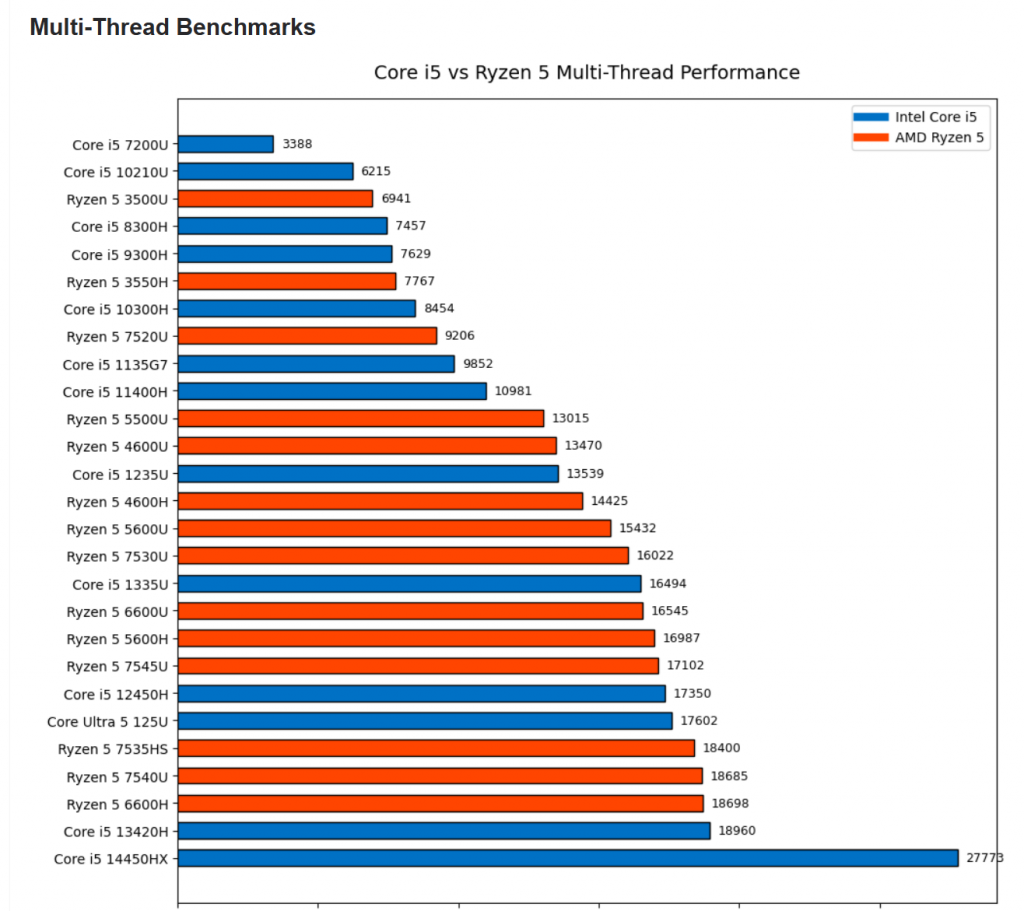
However, this is also where Ryzen 5 CPUs can have an advantage. Intel Core i5 processors can be extremely fast on the first few threads, but that performance advantage can wear off across subsequent cores. Ryzen 5 CPUs tend to maintain stronger performance across multiple cores.
That means a Ryzen 5 laptop can sometimes squeeze out a few more frames in the older, more CPU-dependent versions of WoW even if the Intel CPU has stronger peak single-thread performance.
You can see the CPU comparisons in my Core i5 vs Ryzen 5 laptop CPU benchmarks.
Modern WoW vs Older WoW
WoW Forever: Highly GPU dependent in my testing. Prioritize the graphics card.
Midnight: Same story. The newer graphics engine and visual effects place much more pressure on the GPU than older expansions.
Pandaria: Considerably lighter graphically. CPU performance starts becoming relatively more important.
Classic / Hardcore / Burning Crusade: These versions are extremely light on a modern GPU. Once you’re using an RTX 4050, the GPU has so much headroom that CPU performance becomes the more meaningful difference between laptops.
Simple rule: The newer the WoW version, the more I’d prioritize the GPU. The older the version, the more attention I’d pay to Core i5 vs Ryzen 5 CPU performance.
RAM: 8GB DDR5
8GB DDR5: This is the biggest weakness of this particular Acer Nitro V configuration.
World of Warcraft will run with 8GB, but I wouldn’t leave the laptop that way if you’re spending almost $1,000 on a gaming machine.
Battle.net, Discord, Chrome, add-ons, recording software and Windows itself can easily push memory usage high enough that 8GB becomes annoying.
16GB: This is where I’d stop for WoW. You don’t need 32GB just to play Midnight or WoW Forever.
Upgrade the RAM to 16GB and you’re pretty much done.
Display: 15.6-inch FHD IPS 165Hz
Resolution: 1920 × 1080.
Refresh Rate: 165Hz.
This is actually a very good match for the RTX 4050. The GPU doesn’t have to push the extra pixels required by a QHD display, so you can dedicate more performance toward higher graphics settings and higher framerates.
The older Lenovo LOQ review used a 144Hz display. This newer Nitro V bumps that to 165Hz, which is more than enough for WoW.
You’re definitely going to exceed 60 FPS in many areas, so unlike an old 60Hz budget gaming laptop, the display can actually show those additional frames.
1080p vs 1440p Gaming
You CAN run WoW at 1440p on an RTX 4050, especially if you connect an external QHD monitor.
However, 1080p remains the sweet spot for this particular laptop because that’s the native resolution of the display.
If your main goal is consistently playing WoW Forever or Midnight at 1440p with very high settings, I’d rather move up to an RTX 4060, RTX 5060 or RTX 5070 laptop with an actual QHD screen.
You can read my QHD vs FHD laptop display comparison if you’re deciding between the two resolutions.
RTX Ray Tracing: ON vs OFF
Yes, the RTX 4050 supports ray tracing and WoW supports ray-traced shadows.
But I still don’t think this should influence your laptop choice very much.
The visual difference is relatively subtle compared with games designed heavily around ray tracing, while the GPU performance hit is very real.
This matters even more with Midnight and WoW Forever because these versions already lean heavily on the GPU.
My preference: Keep RTX OFF when you want maximum FPS. Turn it on occasionally if you want better-looking shadows and don’t mind losing some performance.
Storage: 512GB Gen 4 SSD
512GB: Enough if World of Warcraft is your main game.
The Gen 4 SSD is fast enough that loading Windows, Battle.net, WoW zones and other applications isn’t something you need to worry about.
The limitation is simply capacity. If you also play several modern AAA games, 512GB disappears very quickly.
For WoW plus a few other games, it’s fine. For a large Steam library, I’d eventually move to 1TB or more.
Price: RTX 4050 vs RTX 5060
As of October 2026, RTX 5060 laptops are already on the market, so the RTX 4050 is no longer the newest mid-range option.
That doesn’t make it obsolete.
For 1080p World of Warcraft, especially Midnight and WoW Forever, the RTX 4050 still gives you a lot of performance without paying RTX 5060 or RTX 5070 prices.
At around $930, the Acer Nitro V sits between the cheap RTX 2050 Victus and the much more expensive high-end machines.
For 1080p WoW: This is probably the sweet spot.
For 1440p WoW + newer AAA games: I’d spend more on the RTX 5060 or RTX 5070.
For older Classic-style WoW only: You don’t need this much GPU at all. Save your money and focus more on getting a good CPU.
4. HP Victus 15-fb2002la
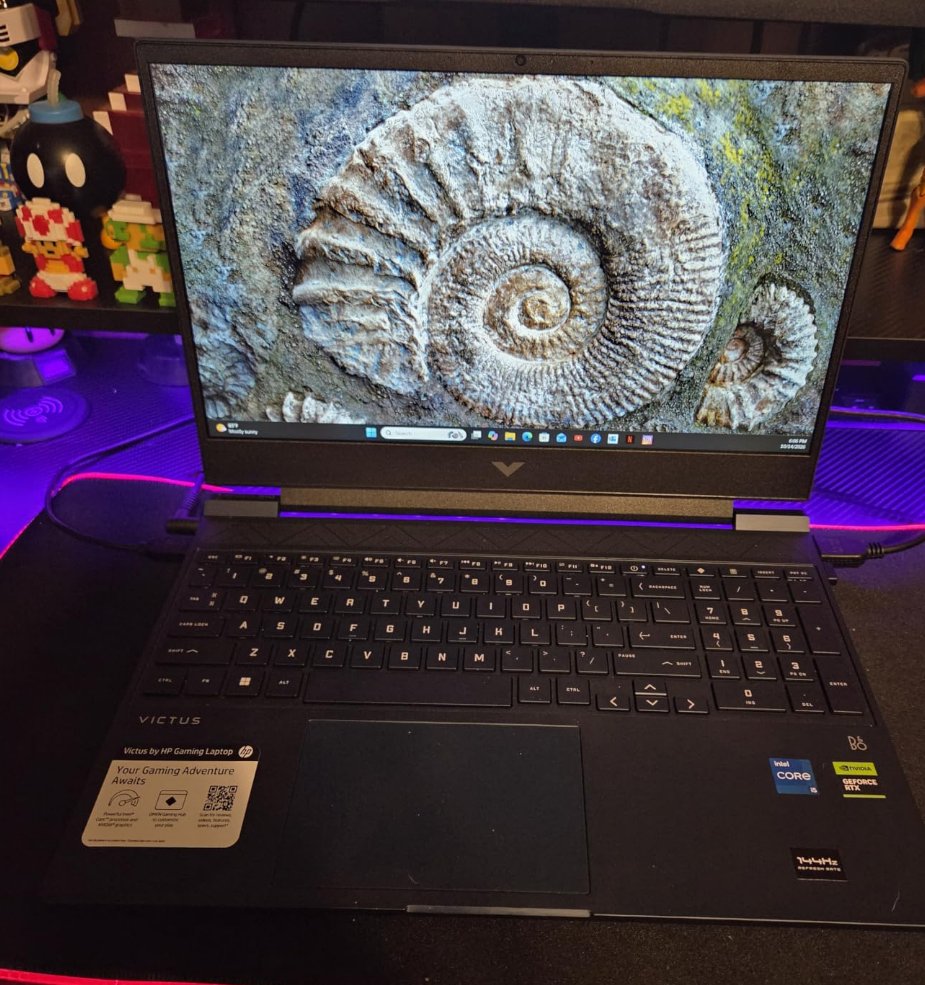
Best Gaming Laptop Deal for WoW: Midnight, Forever & Classic
The RTX 3050 sits right between the cheaper RTX 2050 and the much faster RTX 4050. For WoW Forever and Midnight, that GPU difference matters because my benchmarks show the newer versions of WoW becoming increasingly GPU dependent. I’d only buy this Victus if it’s noticeably cheaper than an RTX 4050 laptop. For Classic, Hardcore, Burning Crusade and Pandaria, the RTX 3050 is already more GPU than you really need.
GPU: RTX 3050 4GB – 75W
The RTX 3050 is MUCH faster than the RTX 2050 and GTX 1650. It has more CUDA cores and substantially more graphics horsepower, which becomes especially useful with WoW Forever and Midnight.
That’s important because my newer WoW benchmarks show a clear pattern: the more modern the version of WoW, the more GPU dependent it becomes.
Forever / Midnight: The RTX 3050 gives you noticeably more room for higher graphics settings at 1080p than an RTX 2050.
Classic / Hardcore / Burning Crusade / Pandaria: These versions are much easier on the GPU, so the difference between an RTX 2050 and RTX 3050 becomes less important.
RTX 3050 Benchmarks
There still aren’t many useful WoW laptop benchmarks using the RTX 3050, but there are enough to get an idea of its performance class.
I also benchmarked the slightly faster RTX 3050 Ti with Shadowlands:
Don’t use the old Shadowlands numbers as exact Forever or Midnight FPS. Those newer versions put much more pressure on the GPU. The benchmark is mainly useful for showing where the RTX 3050 class sits compared with entry-level GPUs.
CPU: Core i5-13420H
Forever / Midnight: I wouldn’t obsess over the CPU here. With a modern Core i5 like the i5-13420H, the RTX 3050 will generally be the more important performance limitation.
Older WoW: Classic, Hardcore, Burning Crusade and Pandaria are less GPU demanding, so CPU differences become easier to see.
Intel Core i5 CPUs can have an advantage in peak single-thread performance, but that advantage can drop off across subsequent cores. Ryzen 5 CPUs tend to maintain stronger performance across several cores, so a similarly priced Ryzen 5 laptop can sometimes squeeze out a few extra FPS in these older, more CPU-dependent versions of WoW.
For modern WoW, though, I’d still prioritize the GPU first.
RAM: 8GB DDR4
8GB is usable, but I’d upgrade to 16GB. WoW plus Battle.net, Discord, add-ons and a browser can make 8GB feel restrictive pretty quickly.
You do NOT need 32GB just for WoW. Sixteen is the sweet spot.
Display: 144Hz Full HD
The 15.6-inch 1080p 144Hz display is a good match for the RTX 3050. I wouldn’t buy this GPU specifically for 1440p gaming.
At 1080p you’ll have enough performance to go well beyond 60 FPS in lighter areas, so the 144Hz panel actually makes sense.
RTX 3050 vs RTX 4050
This is where price becomes VERY important.
If an RTX 4050 laptop is only $50-$100 more, I’d buy the RTX 4050. The extra GPU power matters far more for WoW Forever and Midnight than it does for the older versions of the game.
My limit: I’d only seriously consider this Victus if you can get it for roughly $650 or less.
Trade-Offs
RAM: Only 8GB out of the box.
Weight: About 5.10 lbs.
Battery: Around 3 hours under heavier use. Gaming should be done plugged in anyway.
Value: Don’t buy it too close to RTX 4050 pricing.
6. KAIGERR AX18PRO
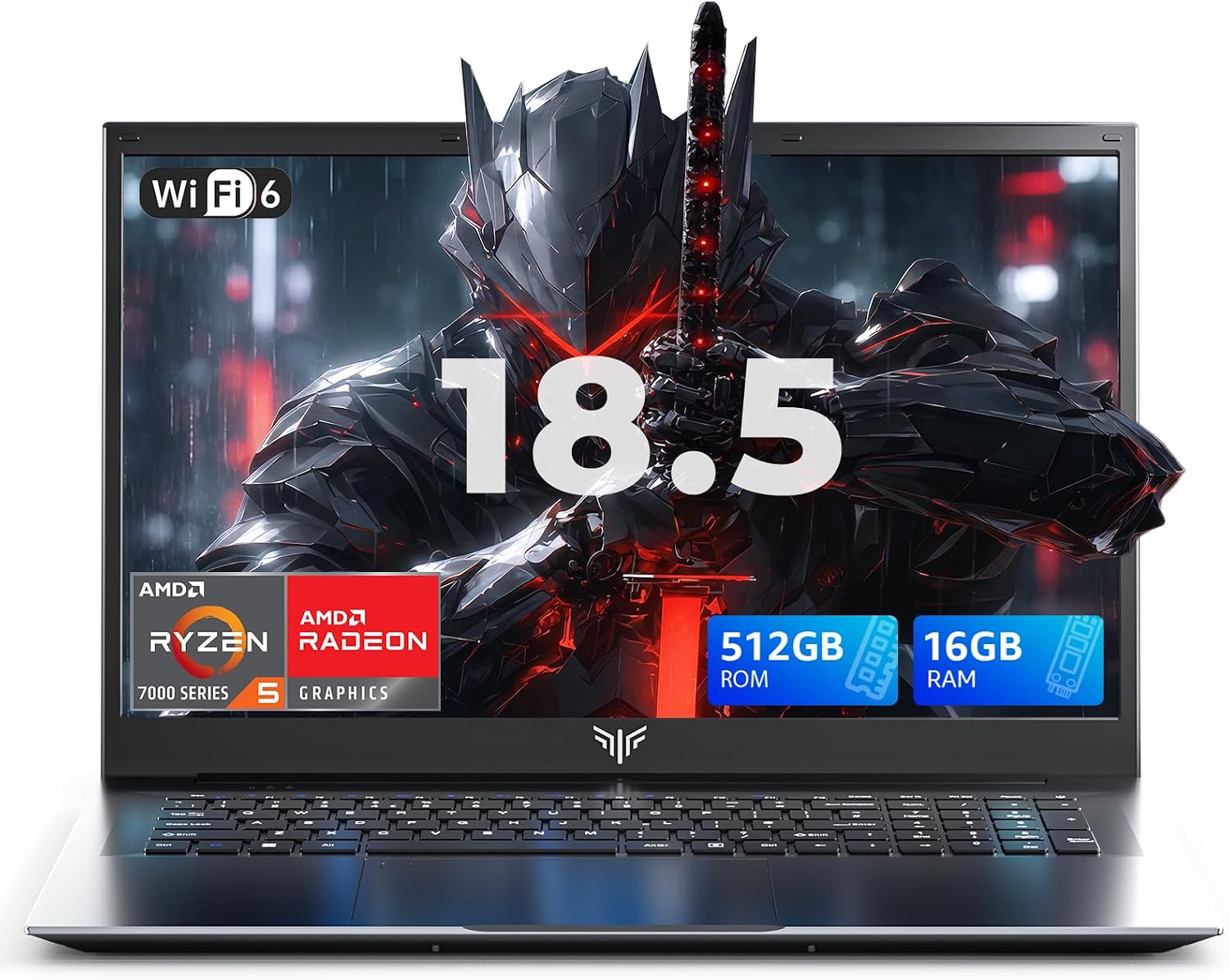
Best Integrated Graphics Laptop for World of Warcraft – 18.5-inch Display
If you absolutely cannot stretch your budget to a dedicated GPU laptop, this is probably the holy grail of cheap integrated-graphics laptops I’ve found so far.
You get a Ryzen 5 7430U, Radeon Vega 7 graphics, 16GB RAM, 512GB NVMe storage AND a massive 18.5-inch FHD display for well under $600.
A big reason the price is this low is probably the brand. KAIGERR obviously isn’t HP, ASUS, Lenovo or Dell, so you’re not paying the same premium for the name. In terms of raw specifications for the money though, this thing is kind of ridiculous.
For older versions of WoW, this is more than enough. WoW Forever and Midnight are a different story because my benchmarks show the modern versions becoming increasingly GPU dependent. Vega 7 can still run them, but this is where you’ll want to lower graphics settings and possibly render scale in heavier areas.
GPU: Radeon Vega 7
If you’re buying a laptop without a dedicated GPU, the integrated graphics should be one of the FIRST specifications you look at.
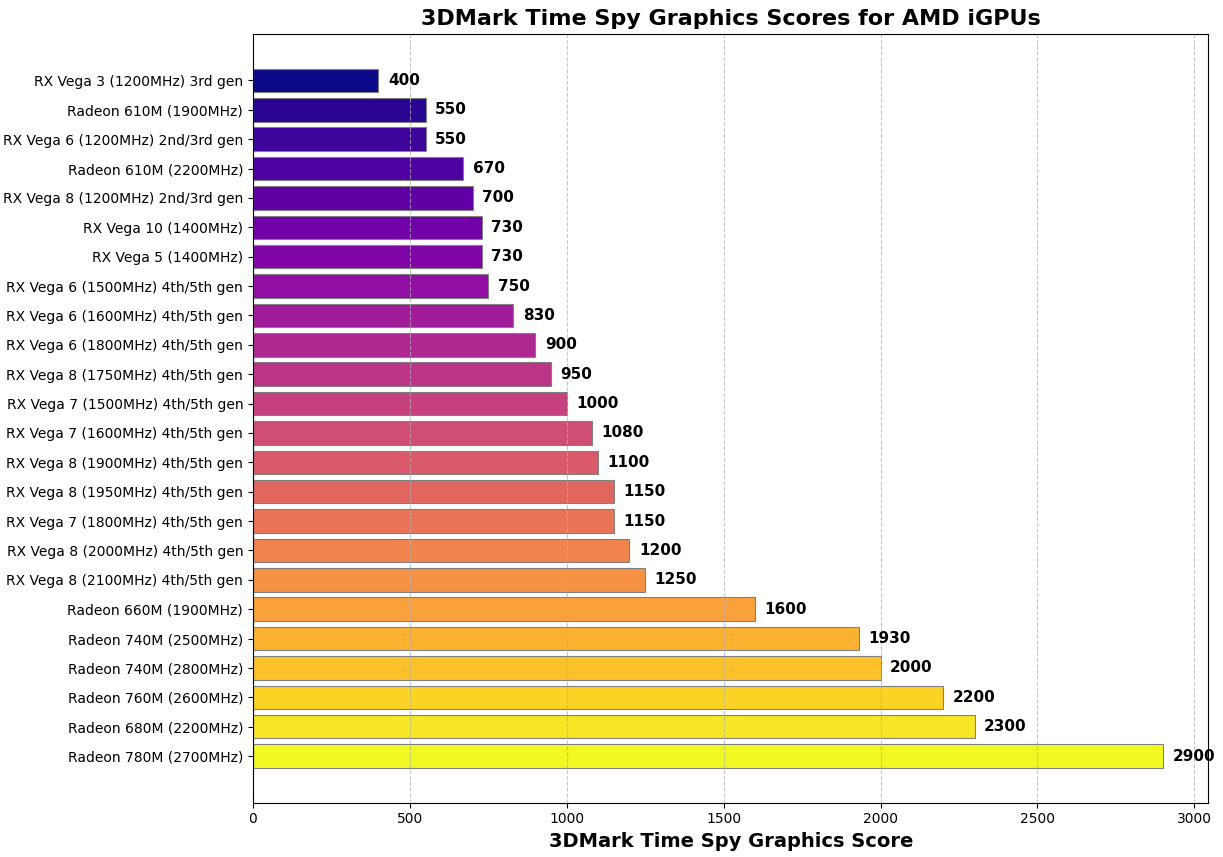
The Ryzen 5 7430U includes Radeon Vega 7 graphics with 7 Compute Units running at up to 1800MHz.
No, Vega 7 isn’t one of AMD’s newest high-end integrated GPUs like the 680M or 780M. But for a laptop in this price range, it’s still a very useful gaming iGPU and much more appropriate for WoW than the really weak entry-level integrated graphics you find in some cheap laptops.
Modern WoW: With WoW Forever and Midnight, the GPU becomes the limitation. Stick to lower settings and reduce render scale if busy areas start hammering the GPU.
Older WoW: Classic, Hardcore, Burning Crusade and Pandaria are considerably easier to run. This is where Vega 7 makes MUCH more sense because you simply don’t need an RTX gaming GPU for these versions.
For more comparisons between integrated GPUs, see my integrated laptop GPU comparison.
CPU: AMD Ryzen 5 7430U
The Ryzen 5 7430U is actually one of the best parts of this deal. You get 6 cores, 12 threads and boost speeds up to 4.3GHz.
Forever / Midnight: Buying an even faster CPU while keeping integrated graphics isn’t going to solve the main limitation. These versions are much more GPU dependent, so Vega 7 will hit its limit before this Ryzen 5 does in many situations.
Classic / Hardcore / Burning Crusade / Pandaria: This is where the Ryzen 5 becomes much more useful because the graphics workload drops and CPU performance starts to matter more.
This is also why I’d much rather have this Ryzen 5 configuration than save a tiny amount of money on a laptop with a much weaker CPU/iGPU combination.
RAM: 16GB DDR4
THIS is one of the biggest reasons I like this laptop so much.
You already get 16GB RAM out of the box.
That’s particularly important with integrated graphics because Vega 7 doesn’t have its own dedicated vRAM. It shares system memory with Windows and the rest of your applications.
So compared with the old 8GB laptop that used to occupy this spot, you’re in a MUCH better position. WoW, Battle.net, Discord, browsers and the integrated GPU all have more breathing room.
There’s no reason to immediately think about upgrading RAM here. 16GB is exactly where I’d stop for WoW.
Forever & Midnight vs Classic WoW
WoW Forever: GPU limited. Keep graphics reasonable and lower render scale when necessary.
Midnight: Same deal. Modern WoW puts much more pressure on the Radeon Vega 7 than the older versions do.
Pandaria: Considerably easier to run and starts shifting more of the performance discussion toward the CPU.
Classic / Hardcore / Burning Crusade: These are where this laptop makes the MOST sense. The graphics workload is light enough that you really don’t need to drag around a dedicated-GPU gaming laptop.
Simple rule: The newer the WoW version, the more the Vega 7 becomes the limitation. The older the version, the better this laptop starts looking.
Display: HUGE 18.5-inch Full HD
This is the other reason this laptop stands out.
18.5 inches. That’s enormous for a cheap non-gaming laptop.
For World of Warcraft, a large screen is actually REALLY useful. There’s more physical room for action bars, quest trackers, raid frames, WeakAuras, Details! and the ridiculous amount of UI stuff most WoW players eventually end up putting on screen.
You still get a full 1920 × 1080 display, but remember that you don’t necessarily need to render modern WoW at native 1080p all the time.
If Forever or Midnight starts struggling, lowering WoW’s render scale is one of the easiest ways to reduce GPU load while keeping the interface at the display’s native resolution.
Storage: 512GB NVMe SSD
You also get a 512GB M.2 NVMe SSD, which is another big improvement over the cheap 256GB laptops that usually populate this price range.
For Windows + World of Warcraft, 512GB is perfectly fine.
You’ll only start running into space problems if you install a bunch of massive modern AAA games alongside WoW.
Price: Why This Is Such a Good Deal
This laptop only works because of the price/spec combination.
For well under $600, you’re getting:
- Ryzen 5 7430U
- Radeon Vega 7 graphics
- 16GB RAM
- 512GB NVMe SSD
- 18.5-inch FHD display
That’s an insane amount of hardware for the price.
The obvious trade-off is that KAIGERR isn’t one of the massive established laptop brands. That’s probably one reason you’re getting so much hardware without paying HP/ASUS/Lenovo prices.
Once the price starts getting close to an RTX 2050 or RTX 3050 gaming laptop though, the recommendation changes. If modern WoW is the main reason you’re buying the machine, take the dedicated GPU.
Trade-Offs
Modern WoW: Forever and Midnight will require lower graphics settings than the RTX laptops above.
Integrated GPU: Vega 7 is excellent for this price category, but it’s still far weaker than a dedicated RTX GPU.
Brand: KAIGERR doesn’t have the same established reputation as HP, ASUS, Lenovo or Dell.
Size: That huge 18.5-inch screen is awesome at a desk, but obviously less convenient if portability is your number-one priority.
Value: The combination of Ryzen 5 + Vega 7 + 16GB RAM + 512GB SSD + 18.5-inch FHD is the whole reason to buy it.
How To Buy The Best Laptop For WoW: All versions
The following buying guide will be based on Benchmarks found on the laptopstudy youtube channel and several other youtube channels.
It’s going to be very long so unless you want to know everythiing there is to know about how the game uses computer hardware ( perhaps if you’re building a desktop or want to extract every single framerate out of your rig), do the following to save yourself time:
World of Warcraft Laptop Requirements
a) If you’re budget is anywhere from 350-500 bucks, just read the upcoming budget section since dedicated GPUs are NOT available in this price range.
b) If you’re budget is above 550 dollars or unlimited. Skip this “budget section” and jump right into the GPU section that follows because it’s FAR more important than CPU (at least on laptops for reasons you’ll see later).
***2026 Update: Midnight & Forever ****
As you see on the video below, the graphical features available on forever are pretty much on par with midnight perhaps slightly higher. There’s definitely ray tracing by default, high textures and resolutions but those are optional. To activate those you would need 8GB vRAM GPUs (since benchmarks shown below show that they usually take 6GB vRAM when everything is maxed out).
A) World of Warcraft Laptop: 500 dollars and below
1. CPU: Recent
Because a budget below 500 dollars cannot get you a dedicated GPU (unless you go refurbished) the CPU will be the single most important hardware behind high framerates at medium or low settings.
Doing so sets you up with the latest “integrated GPU” too. It’s called “integrated” because it’s “integrated” into the CPU.
Thus a good modern CPU is paired with a MODERN integrated GPU.
2. GPU : Integrated
The best integrated GPUs are paired with the best and most recent CPUs. For example:
| CPU | GPU |
| Core i3 1135G5 | Intel UHD Xe G4 |
| Core i5 1135G7 | Intel Iris Xe 80 (1600Mhz) |
| Core i7 1195G7 | Intel Iris Xe 96 (1700Mhz) |
| Ryzen 3 5300U | RX Vega 3 |
| Ryzen 5 5500U | RX Vega 7 |
| Ryzen 7 5700U | RX Vega 8 |
| CPU | GPU |
| Core i3 1215U | Intel UHD Graphics 64 EU (1100MHz) |
| Core i3 1315U | Intel UHD Graphics 64 EU (1250MHz) |
| Core i5 1240P | Intel Iris Xe 80 EU (1300MHz) |
| Core i7 1255U | Intel Iris Xe 96 EU (1250MHz) |
| Ryzen 3 7320U | Radeon 610M (1900MHz) |
| Ryzen 5 7520U | Radeon 610M (1900MHz) |
The above are just the most common examples, you may find CPUs that are of an older generation or CPUs that are of a more recent generation (14th or Ultra) thus the integrated GPUs will be faster or slower.
Core i3 & Ryzen 3: These are the bare bone minimum to play the game. Forget about Celeron, Pentiums and any other CPU that doesn’t have these words on them. Although they have weaker GPUs, if you opt for the modern (most recent ones : 10th or 11th gen) you will get a decent integrated GPU capable of running the game at low settings.
| CPU | RAM (Dual-Channel)? | Expansion | FPS | Graphics | Activity* | Resolution | Benchmark |
| Ryzen 3 3200U | 8GB (Yes) | ShadowLands | 51 | low(2) | questing | 900p | |
| Ryzen 3 5300U | 8GB (No) | ShadowLands | 63 | Low(2) | questing | 900p | |
| Core i3 10100U | 16GB(Yes) | ShadowLands | 65 | Med(3) | questing | 720p | |
| Core i3-1115G4 | 16GB(Yes) | ShadowLands | 72 | Low(1) | questing | 720p | |
| Core i3-1215U | 16GB(?) | Dragonflight | 66 | Low(2) | questing | 1080p | |
| Core i3-1315U | 16GB(?) | Draonflight | 50 | Med(5) | questing | 1080p |
Ryzen 5 & Core i5: Found on 400-500 laptops. The integrated GPUs are MUCH faster than what you find on Core i3 or Ryzen 3 CPUs. If you go for the most recent CPUs (11th Intel & 5th Ryzen onwards) , you will get an integrated GPU that CAN match the performance of dedicated GPUs (with 2GB vRAM). Can easily pull off medium settings and sometimes even high settings!
How? Buy upping your RAM to 16GB (the extra RAM will be used by the integrated GPU boosting performance massively).
I have a separate post discussing this: https://laptopstudy.com/integrated-graphics-16gb-8gb/
Enough talking, you can see the benchmarks below for yourself!
[ScrollableTable]
| CPU | RAM (Dual-Channel)? | Expansion | FPS | Graphics | Activity* | Resolution | Benchmark |
| Ryzen 5 4500U | 16GB (No) | ShadowLands | 62 | Med(4) | questing | 1080p | |
| Ryzen 5 5500U | 8GB (Yes) | ShadowLands | 67 | Med(4) | questing | 1080p | |
| Core i5-1035G4 | 8GB(No) | Battle For Azeroth | 46 | Med(5) | questing | 720p | |
| Core i5-1115G4 | 12GB (Yes) | ShadowLands | 42 | High(6) | questing | 1080p | |
| Core i5 1240P | 16GB(?) | DragonFlight | 40 | Med(5) | questing | 1080p | |
| Core i5 1335U | 16GB | War Within | 50 | Med(5) | questing | 720p |
[/ScrollableTable]
Those are ALL the benchmarks I could get my hands on, there’s a LOT more CPUs available in 2026 especially since we are already in the 9th gen For Ryzen and 14th gen for Intel. The table below shows ADDITIONAL CPUs you might want to consider if they’re within your budget and not more expensive than what’s been shown on the first table.
| CPU | Base | Turbo | Cores |
| i3 8130U | 2.2 | 3.4 | 2 |
| i3 8145U | 2.1 | 3.9 | 2 |
| i3 10050G1 | 1.2 | 3.4 | 2 |
| i3 10100U | 2.1 | 4.1 | 2 |
| i3-1115G4 | 3 | 4.1 | 2 |
| i5 8265U | 1.6 | 3.9 | 4 |
| i5 8250U | 1.6 | 3.4 | 4 |
| i7 8550U | 1.8 | 4 | 4 |
| i5 1115G4 | 2.4 | 4.2 | 4 |
| i7 1165G7 | 2.8 | 4.7 | 4 |
| i7-1260P | 3.4 | 4.7 | 12 |
| i5-1235U | 3.3 | 4.4 | 10 |
| i7-1255U | 3.5 | 4.7 | 10 |
| i7-1265U | 3.6 | 4.8 | 10 |
| i5-1240P | 3.3 | 4.4 | 12 |
| i5-1335U | 3.4 | 4.6 | 10 |
| i7-1360P | 3.7 | 5 | 12 |
| i7-1355U | 3.6 | 5 | 10 |
Q: What about the Core i7 and Ryzen 7 CPUs? What about the 13th generation CPUs in the table? Are they good for WoW?
They obviously ARE ! The problem with some of these non-gaming laptops with the latest 14th gen Intel CPUs or 9th gen Ryzen CPUs is the fact that they’re expensive and they can cost about as much as a laptop with a entry level dedicated GPU like the 2050 which we’ll discuss in the next section.
As far as WoW is concerned, you should only be paying less than 600 dollars for a laptop without a dedicated GPU regardless of how recent and fast the CPU is. Once you go above 600 dollars, you can get a laptop with a dedicated GPU, which, even if outdated, will run WoW far better than the latest budget laptop with the latest CPU.
Q: What about older CPUs, CPUs not on the list?
I recommend you only buy the CPUs listed on the table simply because they have better integrated GPUs. Older generation CPUs have outdated and much slower integrated GPUs and although you will be able to play WoW at low settings w ~20-30 fps, temperatures on your laptop will rise massively which is not ideal when you want to play for long periods of time. More recent CPUs will not only cost more but the integrated graphics won’t be as great as laptops with dedicated GPUs that cost the same.
If you’re just going to join a dungeon for 30 min a day it may be OKAY if you’re DPS (rogue , warlock, mage, etc) but not if you’re a priest or a holy paladin that has to constantly heal everyone and make sure no one dies because those framerates are not going to make it easy to click on the the characters as they move around fighting a boss.
2. RAM for WoW
Integrated GPUs: 8GB vs 16GB
Every laptop above 450 bucks should have 8GB RAM and if your laptop doesn’t have 8GB RAM, you must do the upgrade. It is a MUST.
Although that’s enough to run WoW with no lag AND to handle all the stuff running in the background (Windows 10, Zoom, whatever), if you up the RAM to 16GB RAM you’re going to get a MASSIVE boost in performance ESPECIALLY if you have an integrated GPU.
So imo it is A MUST to upgrade, at some point, to 16GB if you want to play WoW for long periods of time on a low-end system.
Dual Channel RAM
You can squeeze a few more framerates if you do the upgrade in dual-channel mode. Basically having two ram sticks of the same size, type, speed,etc, (just buy them off the same vendor and brand) will speed up CPU-data reading speeds, more details on my dual-channel RAM post.
B) World of Warcraft Laptop: 600 dollars and Up
1. GPU: Dedicated
We’ll go over ALL the dedicated GPUs you’ll find on 2022 in groups and post benchmarks for each groups. Older GPUs are omitted and tips on choosing the best GPU (or what you should know before pulling the trigger on a laptop with said GPU) will be outlined in each group.
i. Dedicated GPUs: 500-600 dollars
| NVIDIA GeForce | CUDA Cores | vRAM | Clock Speed |
| MX250 | 384 | 2GB | 1582 |
| MX350 | 640 | 2GB | 1354 |
| MX450 | 896 | 2GB | 1580 |
| MX550 | 1024 | 2GB | 1320 |
| 1050 | 640 | 2GB,3GB,4GB | 1493 |
| AMD Radeon | Cores | vRAM | Clock Speed | NVIDIA Eq. |
| RX 555X | 768 | 2GB | 855 | MX150 |
| RX 540 | 512 | 4GB | 1219 | MX150 |
| RX 550 | 640 | 4GB | 1287 – 1476 | MX250 |
| RX 560X | 1024 | 4GB | 1172 – 1275 | 1050GTX |
MX250, Radeon 610 & Pro RX 555X: I strongly advice against these. They are dedicated GPUs but are kind of weak yet EXPENSIVE. You can get same or better performance out of laptops with integrated GPUS at a cheaper price(see first section).
MX350 & MX350: These are significantly faster than ANY integrated GPU however you should pay no more than 600 dollars for laptops with either of these. Below are the benchmarks of some of these GPUs. You can use the MX450 to get a sense of the MX350 performance (it’ll be slightly lower).
MX550 & 1050GTX: Both are on paper equally fast (nearly equal) so even if you can’t find benchmarks on the MX550 you can expect the same or better performance from the MX550 (assuming same vRAM) simply because its usually paired with a much more recent CPU (12th or 13th gen Intel or 7th gen Ryzen ).
[ScrollableTable]
| Graphics Card | Processor | FPS | Instance | Version | Graphics | Res. | Video |
| MX150 | Intel Core i5 8265U | 82 | Questing | ShadowLands | Medium | 768p | BenchMark |
| MX250 | Intel Core i5 8265U | 42 | Questing | ShadowLands | High | 1080p | WildGamerSK |
| 1050 4GB vRAM | Intel Core i5 7300HQ | 60 | Questing | ShadowLands | Ultra | 1080p | Maiquera Jogando |
| 1050 3GB vRAM | Intel Core i5 9300H | 60(Vsync) | QUesting | Classic | Ultra | 1080p | PCXGames |
| 1050 4GB vRAM | Intel Core i5 7300H | 70 | Questing | Classic | Ultra | 1080p | HubWood |
| 1050 4GB vRAM | Intel Core i5 7300H | 62 | Questing | Batle For Azeroth | Ultra | 1080p | HubWood |
| 1050 4GB vRAM | Intel Core i5-7300HQ | 81 | Questing | ShadowLands | High | 1080p | Maiquera |
| MX450 | Intel Core i5 1135G7 | 100 | Questing | ShadowLands | High | 1080p | CRNSBENCH |
[/ScrollableTable]
- 1050GTX will perform slightly slower than the MX450 because it lacks a modern and fast CPU. Thus the perforamance at least for this game should be closed to the MX350 which is usually 500 dollars and thats as much as you should pay
- Although the MX450 and the 1050GTX and even the MX250 can run on Ultra settings, temperatures are too high and you should buy these for Ultra setings but rather high (at the most).
- The MX250 ad MX150 should be used to play the game at Medium Settings (ocassionally high).
ii. Dedicated GPUs: 600-700 dollar
| NVIDIA | Cores | vRAM | Speed |
| 1050Ti | 768 | 4GB | 1620 |
| 1650 | 1024 | 4GB | 1560 |
| 2050RTX | 2048 | 4GB | 1470 |
[ScrollableTable]
| GPU | CPU | FPS | Expansion | Instance | Resolution | Settings | Channel |
| GTX 1050Ti | Core i5 8300H | 65 | Battle For Azeroth | Questing | 1080p | Ultra(10) | Majestric |
| GTX 1650 | Ryzen 5 4600H | 70 | ShadowLands | questing | 1080p | Ultra(10) | Laptopstudy |
| GTX 1650 | Core i5 9300H | 70 | ShadowLands | questing | 1080p | Ultra(10) | Laptopstudy |
| GTX 1650 | Core i5 9300H | 100 | ShadowLands | questing | 1080p | Ultra(10) | Gameplay |
| GTX 1650 | Core i5 10300H | 60-70 | ShadowLands | questing | 1080p | Ultra(10) | Jordon J |
| GTX 1650 | Ryzen 5 4800H | 73 | ShadowLands | questing | 1080p | Ultra(10) | Technoriales |
[/ScrollableTable]
- Both the 1050Ti & 1650GTX are more suitable for Ultra settings for long periods of time.
- The choise of the CPU for these kind of GPUs does not seem to matter at least for Ultra Settings
- You can choose either the 1050Ti or the 1650GTX, both perform equally well (more or less).
- The 2050 RTX is clearly above the 1650GTX. There are no WoW Benchmarks with the 2050RTX released yet but expect performance to be close to the 2060RTX shown next.
iii. Dedicated GPUS: 700-800 Dollars
| NVIDIA | CUDA Cores | vRAM | Clock Speed(MHz) |
| 1660 Ti | 1536 | 6GB | 1590 |
| 3050Ti | 2560 | 4GB | 1485 |
| 2060 | 1920 | 6GB | 1680 |
| AMD | Shaders | vRAM | Clock Speed(Mhz) | NVIDIA Eq. |
| RX 580 | 1536 | 6GB | 1077 | ~1060GTX |
| RX5500M | 1408 | 8GB | 1327 – 1645 | ~1660Ti |
[ScrollableTable]
| GPU | CPU | FPS | Settings | Instance | Resolution | RTX Mode | Channel |
| 1660Ti | Core i7 9750H | 65 | Ultra – 10 | questing | 1080p | Unavailable | Erwin Liao |
| RX 5500M | Core i9 9880HK | 60 | Ultra – 10 | questing | 1080p | Unavailable | Laptopstudy |
| RX 5500M | Core i9 9880HK | 35 | Ultra – 10 | questing | 4k | Unavailable | Laptopstudy |
| 3050Ti | Ryzen 7 5800H | 85 | Ultra – 10 | questing | 1080p | OFF | Mariush |
| 3050Ti | Ryzen 5 5600H | 83 | Ultra – 10 | Questing | 1080p | OFF | Laptopstudy |
| 2060RTX | Ryzen 7 4800H | 75 | Ultra – 10 | questing | 1080p | ON | Tech Tyrial |
| 2060RTX | Core i7 10750H | 100 | Ultra – 10 | Raid | 1080p | OFF | All Systems |
[/ScrollableTable]
- All GPUs above perform extremely well for World Of Warcraft on Ultra Settings while keeping tempereatures low. They are ideal to play the game for long periods of time at the highest settings.
- CPU choice does not seem to matter much here either as you can se in the 3050Ti benchmarks thus you can save a lot of money by choosing laptops with cheaper CPUs.
- According to these benchmarks we can conclude that the game is highly dependent on vRAM more than “clock speed” or shaders. This can be seen by looking at the 2060RTX outperforming the 3050Ti (6GB vRAM vs 4GB vRAM) despite having a slower CPU.
- The 3050Ti is the best choice out of this group because it is cheaper and offers similar performance to all the other CPUs.
MUX Switch & GPU TDP (Wattage)
Before you even THINK of investing 900 dollars and up, YOU HAVE TO KNOW what these two terms mean: MUX Switch & Wattage. It is CRUCIAL if you want to get ripped off.
These GPU specs make a MASSIVE difference in performance so please take a look at my two posts: What is a MUX Switch? & What is GPU TDP? BEFORE you check out the following benchmarks unless you already know about the topic.
You can see the difference in wattage here.
iv. Dedicated GPUs: 900-1300 dollars
| AMD Radeon | Shaders | vRAM | Speed | Equivalent |
| RX 6700S | 1975 | 10GB | 1890 | ~3060 |
| NVIDIA | Cores | vRAM | Speed | Lowest TGP | Highest TGP |
| 4050 | 2560 | 6GB | 2370 | — | 115W |
| 3060 | 3584 | 8GB | 1780 | 85W | 130W |
1080P: Ultra (10) Settings
[ScrollableTable]
| CPU | GPU | MUX | RAM | TDP(W) | FPS | Instance | Resolution | RTX | Video |
| Core i7 10870H | 3060RTX | Yes | 16 | 130W | 115 | Questing | 1080p | OFF | Tech Tyrial |
| Ryzen 7 5800H | 3060RTX | Yes | 16 | 130W | 76 | Questing | 1080p | OFF | ASAPAnxiety |
| Ryzen 7 5800H | 3060RTX | Yes | 16 | 130W | 92 | Questing | 1080p | OFF | Tech Tyrial |
| Ryzen 7 5800H | 3060RTX | Yes | 16 | 130W | 108 | Questing | 1080p | HIGH | Mariush |
| Core i5 1245H | 4050RTX | Yes | 16 | ??? | 125 | Questing | 1080p | HIGH | HubWood |
| Ryzen 5 7535HS | 4050RTX | Yes | 16 | 95W | 100 | Alterac | 1080p | OFF | Roland T |
[/ScrollableTable]
- First CPU does not matter much here. At least not as much as GPU Wattage & MUX Switch.
- Most of the laptops benchmarked above are Lenovo Legion Pros. They usually ship with high wattage AND A MUX Switch.
[ScrollableTable]
1440P: Ultra Settings
| CPU | GPU | MUX | TDP(W) | FPS | Expansion | Instance | Resolution | Settings | RTX | Video |
| Ryzen 7 5800H | 3060RTX | Yes | 130W | 83 | ShadowLands | questing | 1440p | Ultra(10) | OFF | Tech Tyrial |
| Ryzen 9 5900HX | 3060RTX | No | 130W | 78 | ShadowLands | Raid | 1440p | Ultra(10) | OFF | Xyonus TV |
- On the other hand, if you want to game at 1440p resolution a high wattage (130W) 3060RTX is a MUST otherwise framearates will dip quite below 60.
- I advice you to invest on 17 inch laptop if you’re going for a high wattage GPU because you need more space to keep temperatures low
[/ScrollableTable]
v. Dedicated GPUs: 1300-2000 dollars
| AMD | Shaders | vRAM | Speed | Equivalent |
| AMD Radeon RX 6800S | 2048 | 12GB | 1975 | +3070 |
| NVIDIA | Cores | vRAM | Speed |
| 3070 | 5120 | 8GB | 1620 |
| 4060 | 3072 | 8GB | 2730 |
| 3080 | 8704 | 10GB | 1710 |
| 3070Ti | 5888 | 8GB | 1485 |
| 3080Ti | 7424 | 16GB | 1590 |
1080P
[ScrollableTable]
| GPU | GPU | FPS | TDP(Watts) | Instance | RTX | Video |
| 3080RTX | Core i9 10980K | 100 | 155W | Torghast | HIGH | Xyonus TV |
| 3080RTX | Ryzen 9 5900HX | 95 | 115W-130W | Raid | HIGH | Xyonus TV |
[/ScrollableTable]
1440P
[ScrollableTable]
| GPU | GPU | FPS | TDP(Watts) | Instance | Resolution | RTX | Video |
| Ryzen 9 5900HX | 3070RTX | 115 | 100W | Main City | 1440p | HIGH | Voidzu |
| Ryzen 9 5900HX | 3080RTX | 85 | 115W-130W | 25 Raid | 1440p | HIGH | Xyonus TV |
| Ryzen 9 7745HS | 5070RTX | 72 | 60W | Questing | 1440p | ULTRA | LAPTOPSTUDY.COM |
[/ScrollableTable]
4k resolution
[ScrollableTable]
| GPU | GPU | FPS | TDP(Watts) | Instance | Resolution | RTX | Benchmark |
| Ryzen 7 5800H | 3070RTX | 75 | 95W | Questing | 4k | HIGH | Fun Laptop |
[/ScrollableTable]
- All of these are only useful for 1440p or 4k gaming.
- Overkill for 1080p Ultra Settings.
- If you are not carefull with wattages, you may get lower performance than the weaker 3060RTX at 1080p.
- These will also outperform any precedding GPU on 1440p/4k resolution regardless of wattage howeverif you choose a low wattage GPU, it will do so only by a small margin thus it is ALWAYS important to invest on a high wattage GPU
2. CPU : High Clock Speed
Once you’ve got two laptops with GPUs that have the exact same performance because both run at the same wattage and have a MUX Switch, YOU CAN BE PICKY about CPUs. Now. the most important question is…
Which is more important? Clock Speed or #Cores?
To make it short and sweet, you have to look after clock speed. Yes, WoW like every other modern AAA game is multi-core (it can use more than one core) but NOT to the point of being more important than clock speed.
There’s been hundreds of benchmarks confirming this, the most convincing and complete multi-core WoW benchmark is the one in this link.
Modern CPUs: Clock Speed performance
[ScrollableTable]
| CPU | Base | Turbo | Cores |
| i5 8300H | 2.3 | 4 | 4 |
| i5 9300H | 2.4 | 4.1 | 4 |
| i7 8750H | 2.2 | 4.1 | 6 |
| i7 9750H | 2.6 | 4.5 | 6 |
| i5-11300H | 2.6 | 4.4 | 4 |
| i5 11260H | 2.6 | 4.4 | 6 |
| i7 10750H | 2.6 | 5 | 4 |
| i7 10870H | 2.2 | 5.00 | 8 |
| i7 11375H | 3 | 5 | 4 |
| i7 11370H | 3.3 | 4.8 | 4 |
| i7 11800H | 2.3 | 4.6 | 8 |
| i9 10885H | 2.4 | 5.3 | 8 |
| i5 12540H | 2.6 | 4.4 | 8 |
| i5 13420H | 1.5 | 4.6 | 8 |
| i5 13500H | 1.5 | 4.9 | 8 |
| i7 12700H | 3.7 | 4.7 | 6+8 |
| i7 12800H | 3.7 | 4.8 | 6+8 |
| i7 13620H | 1.8 | 4.9 | 10/16 |
| i7 13650HX | 3.6 | 4.9 | 10/16 |
| i9 12900H | 3.8 | 5 | 6+8 |
| i7-13620H | 1.8 | 4.9 | 10 (6P + 4E) |
| i7-13650HX | 3.6 | 4.9 | 10 (6P + 4E) |
| i9-12900H | 3.8 | 5 | 14 (6P + 8E) |
| i7-14755HX | 3.5 | 5.4 | 16 (8P + 8E) |
| i9-14955HX | 3.7 | 5.6 | 24 (8P + 16E) |
| Core Ultra 7 155H | 1.8 | 5 | 14 (6P + 8E) |
| Core Ultra 9 185H | 2 | 5.1 | 14 (6P + 8E) |
[/ScrollableTable]
| CPU | Base | Turbo | Cores |
| Ryzen 9 8945HS | 3.3 | 5.2 | 8C / 16T |
| Ryzen 7 8845HS | 3 | 5.1 | 8C / 16T |
| Ryzen 9 7945HX | 2.5 | 5.4 | 16C / 32T |
| Ryzen 9 7940HS | 4 | 5.2 | 8C / 16T |
| Ryzen 7 7745HX | 3.6 | 5.1 | 8 |
| Ryzen 7 7840HS | 3.8 | 5.1 | 8 |
| Ryzen 9 6980HX | 3.3 | 5 | 8 |
| Ryzen 9 6900HS | 3.3 | 4.9 | 8 |
| Ryzen 7 6800H | 3.2 | 4.7 | 8 |
| Ryzen 9 5900HX | 3.3 | 4.6 | 8 |
| Ryzen 5 8645HS | 3.2 | 5 | 6C / 12T |
| Ryzen 5 7535HS | 3.3 | 4.5 | 6/12 |
| Ryzen 9 4900HS | 2.2 | 4.4 | 8 |
| Ryzen 5 6600H | 3.3 | 4.5 | 6 |
| Ryzen 7 5800H | 3.3 | 4.4 | 8 |
| Ryzen 7 4800H | 2.9 | 4.2 | 8 |
| Ryzen 5 5600H | 3.3 | 4.2 | 6 |
| Ryzen 7 3750H | 2.3 | 4.0 | 4 |
| Ryzen 5 4600H | 3.0 | 4.0 | 6 |
| Ryzen 5 3550H | 2.1 | 3.7 | 4 |
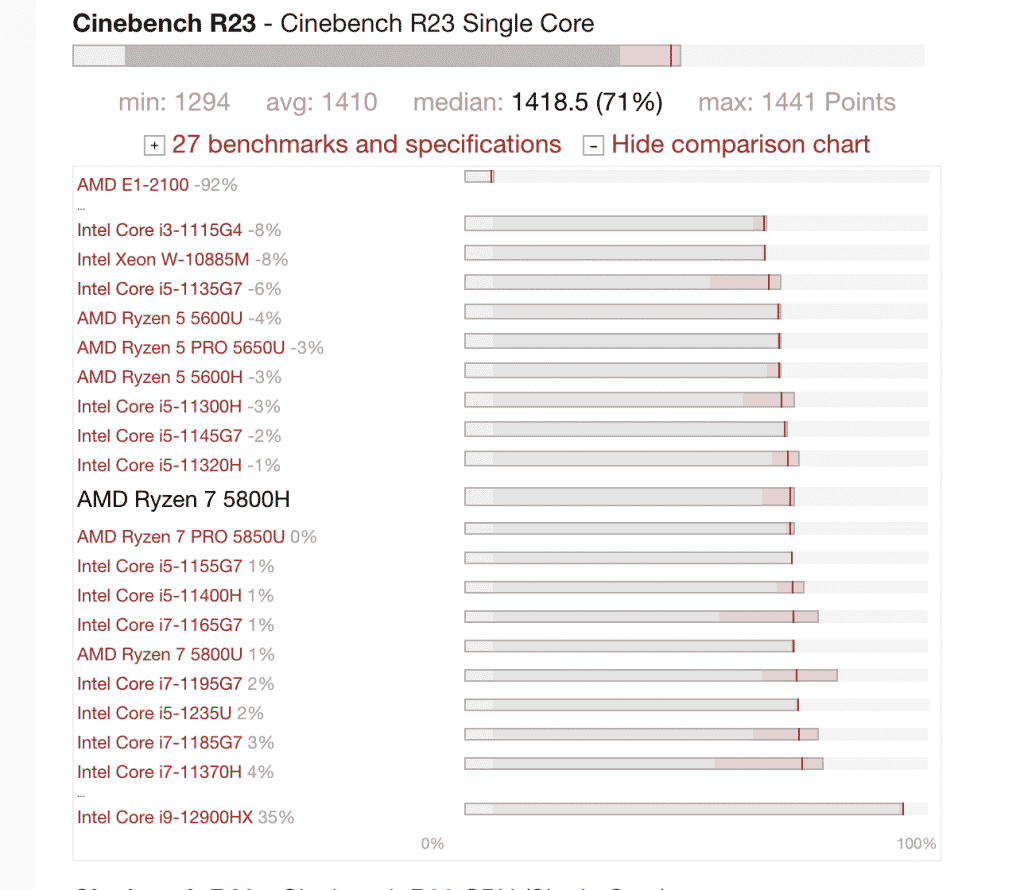
The table above ranks CPUs according to their single-core performance
It’s pretty easy to tell which one has “more clock speed” if we are talking about the same brand AND the same generation.
For example, if you have to choose between a Core i7 12800H & Core i7 12700H, then Core i7 12800 is faster.
Now..gaming is all about SINGLE core performance (although multiple cores help, gaming is mostly single core).
Single core performance comparison between two CPUs of different generation is tricky and even more tricky if they are from different brands. Your best bet is to use benchmarks by notebookcheck or those found on youtube. You don’t need to do this for the CPUs in the table , i’ve already done all that work for you.
AMD vs Intel
You want to first check on youtube if there are any direct comparisons.
If there isn’t any check thirdparty benchmarks such as those found in notebookcheck and looking after single core clock speed performance.
3. Heat Control
Bad heat control designs is the main reason why most gaming laptops will last a bit more than year, yes you heard ONE year if you play everyday 8 hours a day.
This is even worse if you play at high/ultra settings or even 1440p/4k resolutions. These much graphics put a LOT of stress on a system. Ideally here you’d want a 3070Ti at least (for 1440p) and making sure it’s on a 17” laptop, wattage doesn’t matter much if you can get that GPU (3070RTX will not be very useful if running at low wattages).
8 hours? Who the hell plays 8 hours?
Well, you’re probably new to WoW if you have to ask that. But it’s very common for laptops to die faster in the WoW community I’ll tell you that much!
Here’s a few more tips:
- Get one from gaming brands like MSI and ASUS. These two have the best cooling systems.
- Other brands are cool too but you’ve got read reviews like it’s the last laptop you’ll ever buy.
- If you read a review complaining about heat RUN.
- Get a cooling and pad and software to control temperatures. If temperatures are above 80, stop playing the game , let it rest or figure out how. to cool it down.
- Budget laptops will overheat massively if you go to high settings and even 1650GTX (low -midrange) laptops will heat too at ultra settings if you play for several hours. Just be sure to switch back to low settings when possible.
- Do not overclock anything.
- Lower down graphic settings after two hours if you’re playing at 1440p.
4. Storage For WoW
All laptops have SSDs now only old laptops still have an HDD. You must do the upgrade if that’s the case and just use the HDD as a repository. Otherwise launching the game and booting up will take ages.
Size
256GB: WoW takes 100GB (Midnight) . Expect Forever to take 100GB (at least) and if you’re playing classic you need an additional 70GB, that’s almost 190GB. Add Windows 10 or Windows 11 and you’ll make it to 220GB. Since most laptops have at least 256GB you should be alright.
512GB: Super useful to have a few other AAA titles installed.
128GB: If you’ve got a budget under 400 dollars, this is as much as you’re going to get (assuming you also get a late generation CPU with the latest integrated GPU) just be aware you’ll need to the upgrade (40 bucks).
Comments?
If you have any comments, suggestions, questions or recommendations please let us know in the comments below or you can send us an email. Laptopstudy takes your input very seriously because to be honest we use it to improve future versions of this post.

Appreciated your honesty in assessing these laptops for BfA. My MacBookPro just stopped playing WoW & I’m looking for alternatives. I’d buy a new MBP but mine still does everything I need it to do! – except play Wow, lol.
Really how old is your MBP? I got a 2015 MBA and I can still run WoW, even BfA on it…and it’s playable. This is BfA, check the quest on the top.
https://uploads.disquscdn.com/images/5b8e5d28714163314a6bdf56ff465808019a5e1ba9d17193c2954ee24fc799fa.png
Hmm, a 2015 could do the trick then? Cool! I am looking into options. Will prob stay with Mac.
2010?! Wow that’s oldschool AF, it just goes to show you these suckers last forever….
My MBP is a Mid-2010. I’m old school 😉
thank you so much for explaining all this in detail. i have found two different gaming laptops that have got my interest. I am currently on a MBP 2015, and it cant run the new wow expansions anymore. So i wanted to ask you two different questions. The first one is- are these two laptops good to run and play wow safely ? https://www.amazon.fr/HP-15-ax202nf-Portable-GeForce-Windows/dp/B01MT7MTR5/ref=sr_1_fkmr1_2?ie=UTF8&qid=1535296667&sr=8-2-fkmr1&keywords=CUK%2BOMEN&th=1
https://www.fnac.com/mp34694521/Acer-Aspire-VX5-591G-55FB-PC-Portable-Gamer-15-6-FHD-Noir-Processeur-Intel-Core-i5-4-Go-de-RAM-1-To-SSD-128-Go-NVIDIA-GeForce-GTX-1050-Windows-10/w-4#
and the second question i would have for you is, which would be more ideal ?
Again thank you so much for these details.
All of them can play Wow at high settings even with the new expansion. I would pick the first one though just because the RAM size is 8GB as compared to the 4GB the other two have. You can actually pick any of the other two as long as you upgrade the RAM to 8GB on your own, if you rather not do that, then just pick the first one. HPs are quite resistant too just be careful with hinges….my monitor eventually stopped working because I’ve kept forcefully messing around with the hinges to the point something inside broke or got unplugged..some cable or connector… (you could open it up and fix it though). The hinges from Macs on the other hand seem to be undestructible….can’t say that about all other brands.
thank you so much !