Desktop CPU vs Laptop CPU Performance Comparison Chart
We all know desktop CPUs are more powerful and faster than laptop CPUs.
Laptops are limited to low power and small sized chips whereas desktop CPUs are not limited by space nor power.
However…
Just how powerful are desktop CPUs compared to laptop CPUs?
Say…what’s the desktop CPU equivalent of a Core i5 12450H? Could it be a 10th gen Core i3 desktop CPU?
Benchmarks: Measuring CPU performance
Benchmarks are scripts (steps) that test a CPU’s performance. Our goal is to get a relative performance and not an accurate estimate of the each CPU performance.
Thus, we will limit ourselves to the PassMark Score benchmarks. This is one of the most popular ones along with 3DMark which we’ll add in future updates.
PassMark BenchMark Scores
“PassMark runs heavy mathematical calculations that stress the CPU’s performance at compression, encryption, and physics-related tasks.”
In other words, we can use these scores to get a sense of how much one CPU outperforms another CPU on functions and operations from ANY software that doesn’t rely on graphics cards or the heavy manipulation of images.
As the definition says “mathematical calculations”.
This means the following tasks:
- Web browsing, virus scanning, file compressions, back-ups
- Data Science tasks (non-Parallel)
- Compiling code
- Virtual machine performance.
- Spreadsheet calculations (multi-core)
- Photo & Video Editing effects, functions and rendering
- Final 3D Work Rendering (multi-core)
Though these benchmarks can ALSO be used to estimate the relative performance in 3D work & image rendering processes (gaming, 3D Animation, 3D CAD design), a more accurate benchmark for 3D or graphics related tasks would include 3D mark tests.
Single-Thread vs Multi-Core Benchmarks
Benchmarks are divided in two parts: single-thread (using one CORE) vs multi-core (using all CPU cores).
It’s important to look at the two different benchmarks separately because some tasks are mostly single-threaded (they only run on mostly one core) while some others are multi-threaded.
Check my post here for a complete list of multi-threaded vs single-threaded tasks.
Single-Thread CPU Performance Comparison
Core i3 Benchmarks
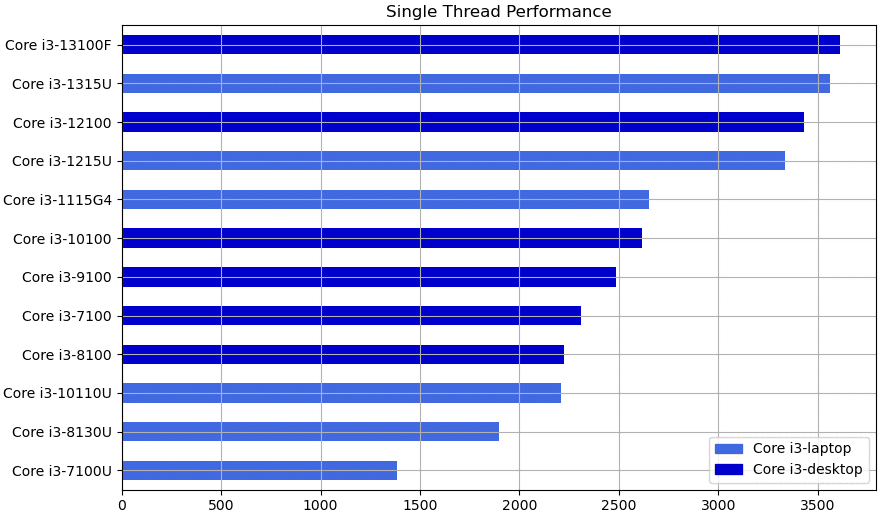
Some observations you can see right away:
- For the 12th and 13th gen Core i3 CPUs. There isn’t much of a performance gap between the Core i3 laptop and desktop CPUs.
- The 11th gen Corei 3 Laptop CPU: Core i3 1115G4 is the last laptop CPU that rivals and outperforms lower generations desktop CPUs.
- The laptop Core i3 115G4 out performs 7th,8th 9th and 10th gen DESKTOP Core i3 CPUs.
- 10th gen Core i3 laptop CPUs are outperformed by all other lower generation desktop CPUs (7th, 8th and 9th and 10th).
Core i5 Benchmarks
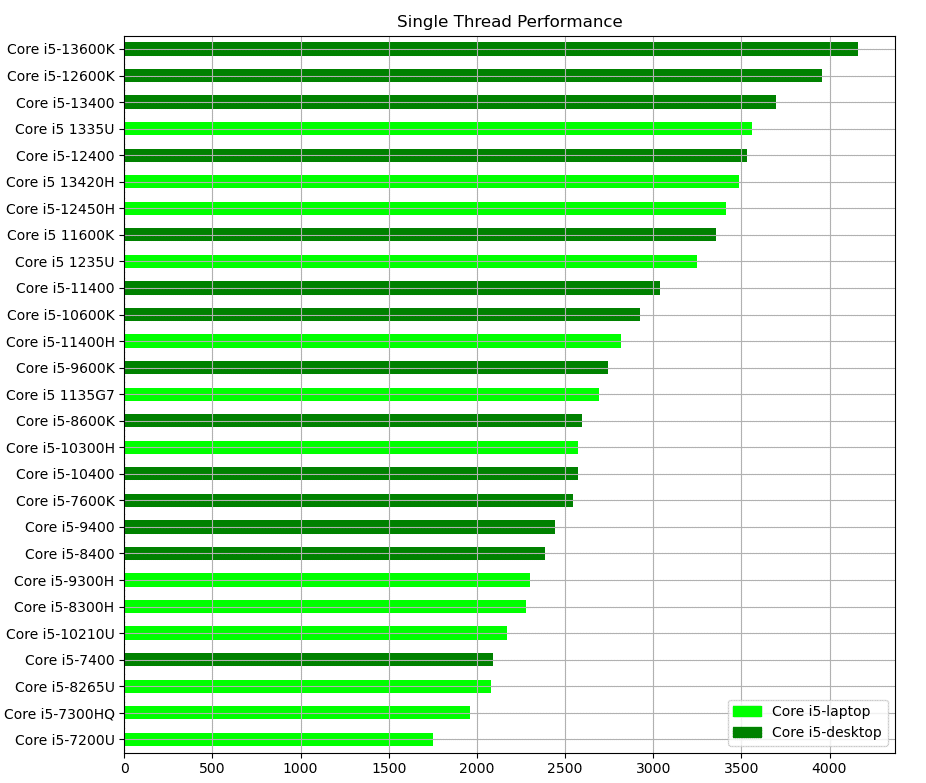
- The performance of the fastest 12th and 13th gen Core i5 Laptop CPUs is similar or slightly below a Core i5 12400 desktop CPU (unlocked).
- 12th gen & 13th gen Core i5 LAPTOP CPUs are FASTER than 11th gen Core i5 desktop CPUs and previous generation desktop CPUs.
- 10th gen Core i5 “unlocked” desktop CPUs are faster than 11th gen Core i5 laptop CPUs
- 8th gen Core i5 “unlocked” desktop CPU (Core i5 8600K) outperforms 10th gen Core i5 laptop CPUs.
Core i7 Benchmarks
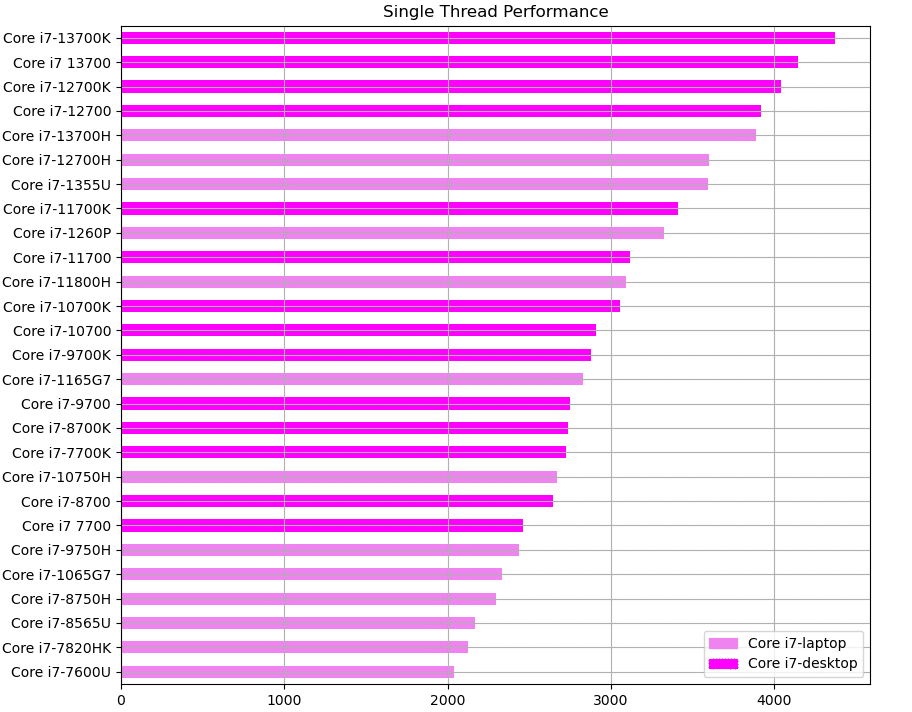
- Core i7 12700 and 12700K CPUs are 0.85% and 3.89% faster than the 13th gen Core i7 Laptop CPU (Core i7 13700H)
- The Core i7 13700K desktop CPU is only 6.67% faster than the 13th Core i7 13700H laptop CPU.
- A 7th gen Core i7 7700K desktop CPU is faster than ANY Core i7 laptop CPU from the 10th generation and below.
- A 10th generation Core i7 10700K destop CPU has ALMOST the same performance as the Core i7 11800H.
Core i9 Benchmarks
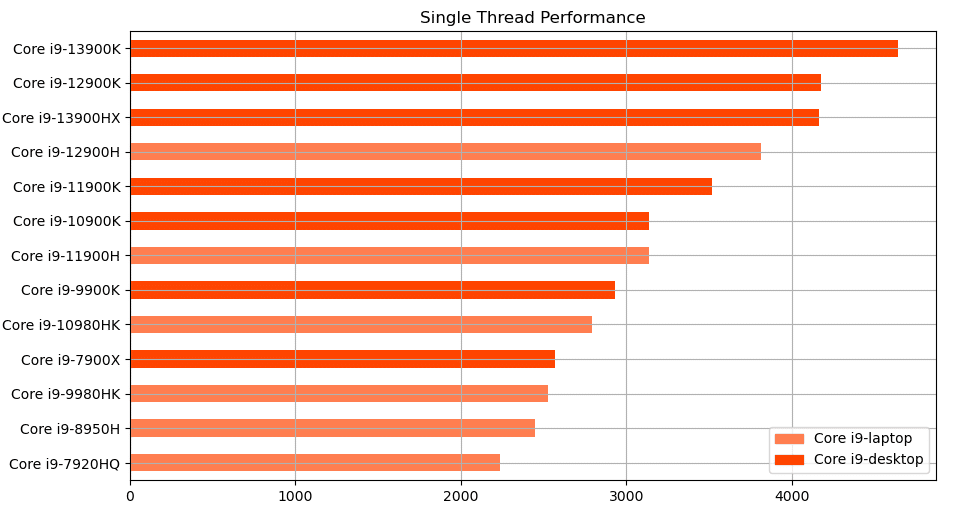
- The desktop Core i9 13700K is 12% faster than its laptop counterpart (Core i9 13900H)
- The performance of the Core i9 13900H laptop CPU is almost the same as the Core i9 12700K desktop CPU.
- The 10th gen Core i9 10900K desktop CPU has the same performance as the Core i9 11900H desktop CPU.
- A desktop Core i9 9900K is faster than any 10th generation Core i9 laptop CPU.
All CPUs Single Thread Benchmarks
If you don’t care about labels (Core i5, Core i7, etc) and you just want the best single-thread performance you want to compare all CPUs. The results of the graph below are very very interesting:
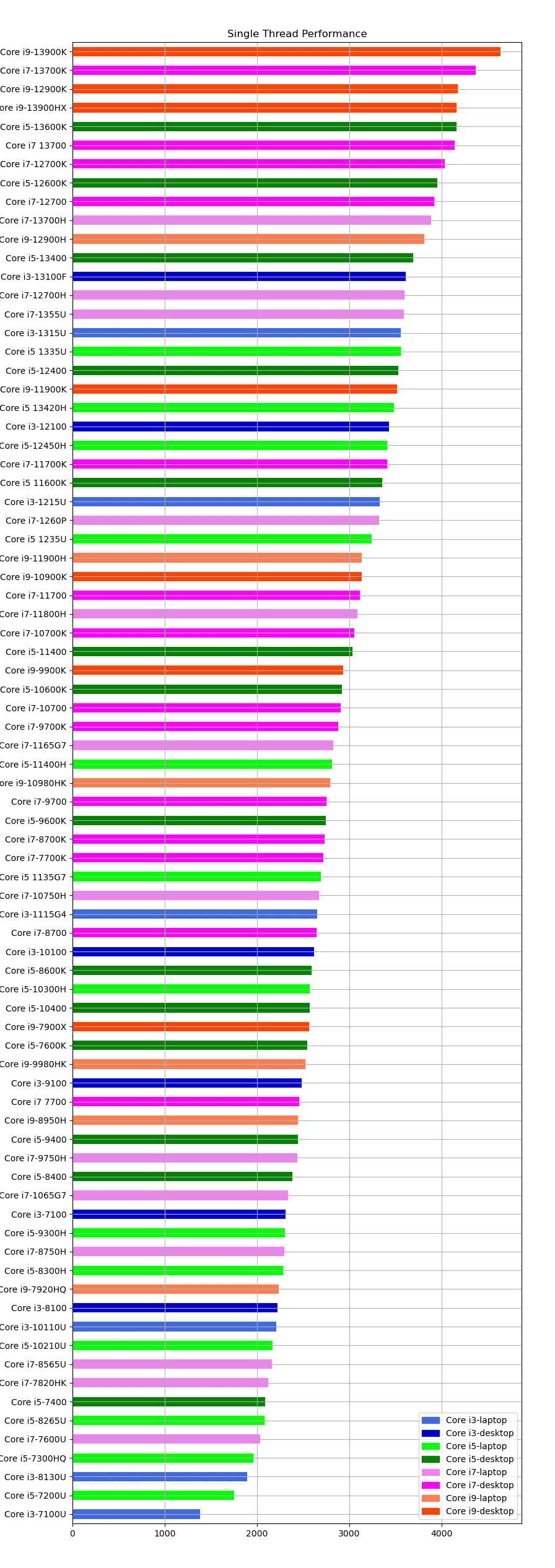
- A Core i7 13700K desktop CPU is 4.92% faster than the a 13th gen Core i9 laptop CPU.
- A Core i5 13600K has approx. the same performance as a 13th gen Core i9 laptop CPU (Core i9 13900H).
- A Core i5 12600K is faster than the Core i9 12900H and the Core i7 13700H.
- A 13th gen Core i3 desktop CPU is faster than all laptop CPUs from the 12th gen and below.
- A 12th gen Core i3 desktop CPU is faster than an 11th gen Core i9 laptop CPU.
- A 9th gen Core i3 desktop CPU (Core i3 9100) is faster than all laptop CPUs from the 9th gen and older generations.
- A 9th gen Core i5 9600K desktop CPU is faster than all 10th generation and below laptop CPUs.
Multicore Performance CPU Comparison
The following graph shows you the multi-core benchmarks of all CPUs.
It doesn’t seem useful to separate these into three different graphs like we did with the single-thread results because multi-core performance is more about the number of cores than anything else.
For example…A core i5 can outperform a Core i7 and perform just as well as Core i9 if it has the same amount or more CORES.
Thus if you want to get the best bang for your buck you want to compare the performance of ALL CPUS with each other.
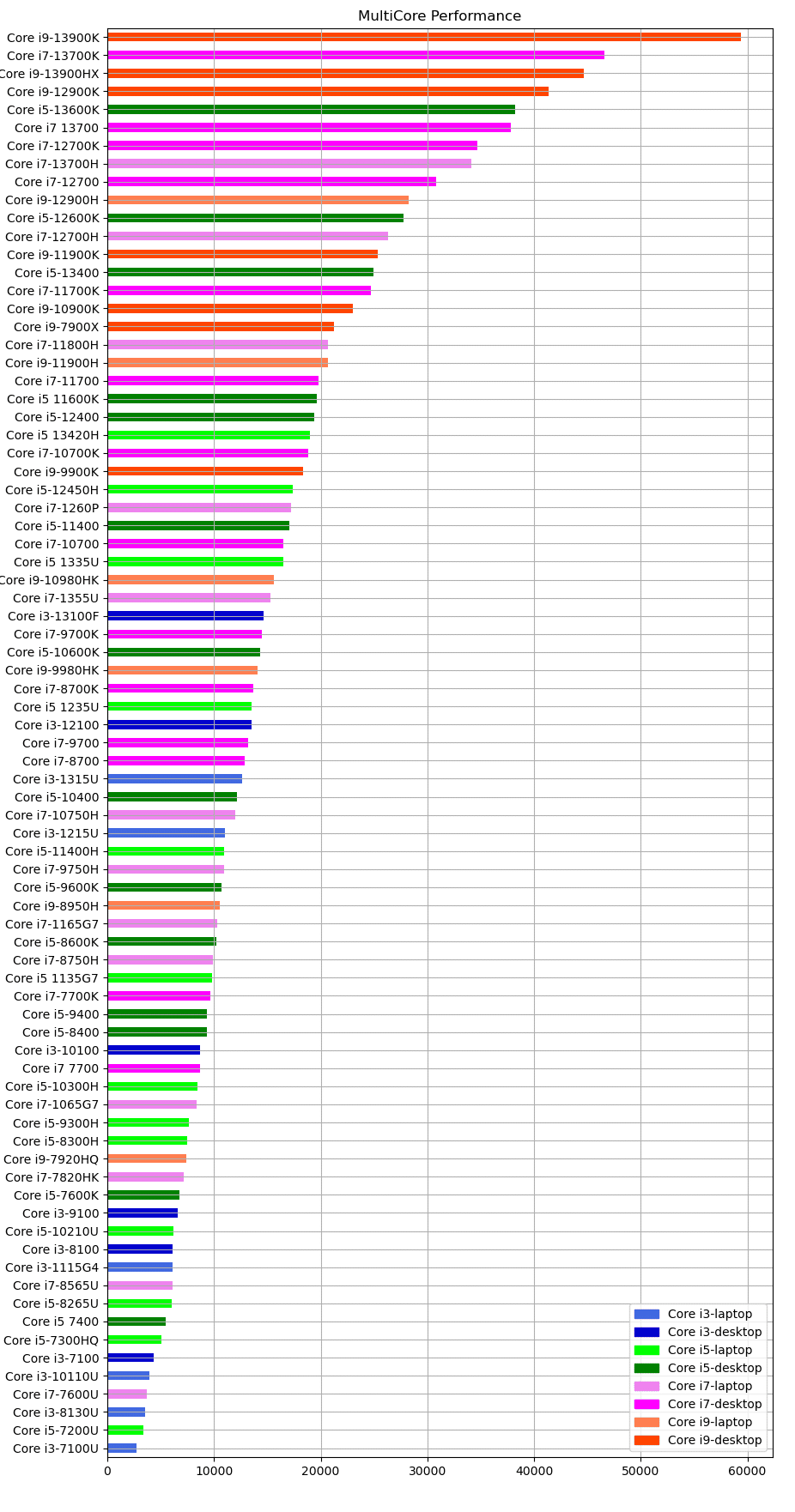
Some interesting observations from this graph are:
- Core i5 13600K is 15.72% faster than the Core i7 13700H.
- Core i7 12900K > Core i9 12900H & Core i7 13700H
- Core i5 12600K is only 3.65% slower than the Core i9 12900H.
I’ve attached the number of cores on each of these CPUs & their clock speed in the graph. Notice when the # of cores is the same, the performance is nearly equal when you compare CPUs around the same generation.
This means if you want to look at the best bang for your buck CPU for multi-threaded applications, you need NOT to focus on the latest and faster CPUs but rather at the ones with the highest number of cores for a given budget.
